REVIEW 2 major objections 4 minor 71 references
Designing at 1:1 Scale on Wall-Sized Displays Using Existing UI Design Tools
T0 review · 2 major / 4 minor · reviewed 2026-08-06 · deepseek-v4-flash
Pith's one-line read The paper shows that 1:1 scale prototyping on wall-sized displays is appreciated and feasible with desktop tools, but none of the nineteen tools reviewed fully supports it; Miro is most suitable, and tablet interaction is most comfortable.
desk verdict Genuinely useful exploratory study, but the 1:1 scale condition is never instrumented; worth review with major revision. read the letter →
The pith
A machine-rendered reading of the paper's core claim, the machinery that carries it, and where it could break.
The reading
What carries the argument
The carrying mechanism is a two-part instrument: a fixed reproduction task and a feature checklist. Participants reproduced one previously built wall-display UI, containing text, sliders, a graph, and a social media feed, at actual size on a curved 3.64 m display and a flat 7 m display, under three input conditions: touch, wireless keyboard with touchpad, and synchronized tablet. Study 1 with Figma produced six concrete issues that were converted into a list of required tool features; that list was then applied to 19 tools, leading to the selection of Miro for Study 2. The combination of the two wall geometries, the three modalities, and the feature matrix is what lets the paper separate tool-design problems from hardware problems and from interaction-modality problems.
What would settle it
Run a controlled study with a larger sample, for example twelve designers, half using Miro and half using a tool with retractable panels and viewport locking, on an open-ended design task across several wall sizes; if designers show no consistent preference for tablet input, no reduction in fatigue, or no advantage for the guideline-compliant tool, the central claim would be contradicted.
Extended reading notes
Core claim
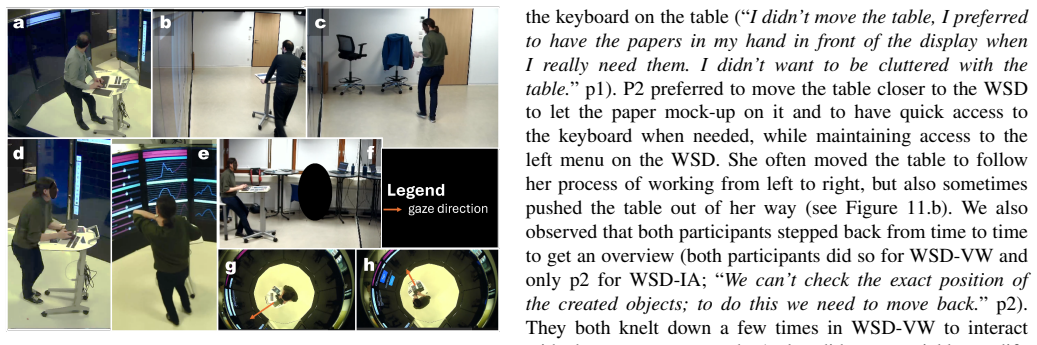
On the paper's own terms, the central discovery is that 1:1 prototyping on wall-sized displays is feasible with current tools, yet the tools fail in systematic, fixable ways. The first study with Figma identifies six recurring issues: physical fatigue, unreachable menus and property panels, tool text that is hard to read from a distance, the sheer interaction surface, objects resetting to the center on reopen, and tool panels occluding part of the wall so the design surface is no longer truly 1:1. The feature matrix built from those issues shows that none of the 19 tools satisfies all requirements; Miro comes closest because its main menu sits on the left at a reachable height, its context menus appear next to the selected object, and it preserves positions on reopen. The second study shows that the tablet's dissociated viewport is the most comfortable interaction pattern, while touch gives the best spatial sense but causes fatigue, and the keyboard offers precision but a hypersensitive touchpad. These results ground the paper's twelve design guidelines, which center on reachable menus, movable or retractable panels, viewport locking, a second device with an independent view, and careful attention to the physical furniture.
Load-bearing premise
The findings rest on three participants reproducing a single existing interface on two specific wall displays, so the observed preferences and guidelines may not transfer to creative, open-ended design work or to other wall configurations.
Editorial extensions
If this is right
- Future design tools for wall-sized displays should place creation menus and object properties near the work area rather than at fixed screen edges.
- Tool panels and dialogs must be movable or hideable so the entire wall surface can serve as the design canvas.
- A synchronized handheld device with a viewport decoupled from the wall should be part of the setup, since it allows precise close-up work without disturbing the on-wall view.
- Designers should be able to switch among touch, tablet, and keyboard within a single session, because each modality has distinct strengths.
- Physical environment is part of the design tool: height-adjustable, movable, tilting tables and available chairs reduce fatigue and extend productive session length.
Reading between the lines
- If these patterns generalize, collaborative wall-scale design becomes plausible across distances: the tablet already separates the control surface from the display surface, so the same architecture could support a remote designer controlling a shared wall.
- The feature checklist could serve as a quick heuristic evaluation for any new or updated tool claiming wall-display support, even before running user studies.
- A natural next experiment is to add viewport-lock and reset-view buttons to an existing tool like Miro and measure whether unwanted zoom and pan events and fatigue drop, which would test the causal story behind the guidelines.
- The 1:1 method also invites systematic readability and accessibility checks from multiple viewing distances, which the current study observed only informally.
Editorial analysis
A structured set of objections, weighed in public.
Referee Report
Summary. The paper investigates whether desktop-optimized UI prototyping tools can be used to design at 1:1 scale on wall-sized displays (WSDs). It comprises a technology review of 19 design tools against a feature list derived from a first exploratory study, followed by two user studies: Study 1 (n=1) with Figma and Study 2 (n=2) with Miro, across two WSD setups and three interaction methods (keyboard with touchpad, direct touch, synchronized tablet). The main findings are that participants appreciated designing at large scale, that the tablet was experienced as comfortable by some participants, that each modality has distinct benefits and drawbacks, and that no existing tool fully supports this use case. The paper proposes twelve design guidelines and concludes that existing desktop-optimized tools require further considerations in terms of placement of UI elements and additional features.
Significance. The work addresses a genuine gap: there is little prior research on prototyping UIs directly on WSDs at real size. The feature matrix (Table II) and the detailed qualitative observations (Studies 1 and 2) are valuable empirical material, and the authors are transparent about several limitations (small number of participants, reproduction task, learning effect) in Section VII-D. The supplementary materials and explicit reporting of participant strategies are strengths. However, the central claim hinges on the fidelity of the 1:1-scale manipulation, which is not verified in the paper.
major comments (2)
- [VI-A, III-C] The central condition '1:1 scale' is not instrumented. Section III-C describes the system but does not state how design-tool units were mapped to physical WSD pixels. Section VI-A reports 'The zoom level in the browser was set to 200%' to make the main menu usable, which scales the entire Miro canvas; if Miro's internal zoom was not simultaneously reduced (e.g., to 50%), every object was rendered at approximately twice the intended physical size. No calibration check is reported for the Figma study either. The paper's conclusions that 'designing at 1:1 scale was appreciated' (Section VI-B, VIII) therefore attribute the observations to a condition that may not have occurred. Section VII-D lists limitations but omits this. Without an explicit calibration procedure (e.g., placing a known-size element on the canvas and measuring it on the wall, or setting the tool's zoom to compensate), the independent variable is not verified, which affects the validity of the scale-specific guidelines in Section VII-C.
- [Abstract, VII-A] The abstract's claim that 'tablet-based interaction proved to be the most comfortable' is not supported by the reported data. In Section VII-A, P1 explicitly preferred touch and ranked the tablet second; only P2 ranked the tablet first. With only two participants in Study 2, this is an overgeneralization. The conclusion in Section VIII uses the more cautious 'seems to be,' but the abstract states it categorically. The wording should be revised to reflect the disagreement, e.g., 'the tablet was preferred by one participant and ranked second by the other.'
minor comments (4)
- [VI-A] The sentence about browser zoom would be clearer if it also reported the Miro canvas zoom level and the resulting effective scale relative to the physical display.
- [V] The feature matrix in Table II contains several 'unknown' entries (e.g., max surface size for Miro, Excalidraw, InVision); the conclusion that Miro is the most suitable should be phrased as 'among the tools with sufficient information,' or the method for obtaining these values should be documented.
- [V] The search methodology in the technology review is described only as 'a search using the engine Google with the keywords between July and December 2024'; providing the exact queries and search dates would improve reproducibility.
- [VII-D] The limitations section lists several threats to validity (small sample, reproduction task, learning effect) but does not acknowledge the absence of an explicit 1:1 calibration check, which should be added if the study is revised.
Circularity Check
No significant circularity: the paper's conclusions rest on new observational data, and its self-citations and in-house task stimulus are not load-bearing reductions.
full rationale
This is an empirical HCI paper with no mathematical derivation, fitted model, or uniqueness theorem, so the formal circularity patterns do not apply. The self-referential elements are: extending the authors' CENTRIC 2024 Figma study [1], citing the authors' earlier challenge list [20], and using the authors' own previously developed UI [43] as the task to reproduce. None of these forces the conclusions: [1] provides prior background while Sections IV and VI report new sessions; [20] is a framing citation for known WSD challenges; and [43] merely supplies a concrete, feasible stimulus. The Miro suitability conclusion does trace back to a feature list derived from the first Figma study, but that list is a substantive requirement set, and the feature matrix plus the second user study add independent evidence rather than defining the outcome by construction. The 200% browser zoom setting in Section VI-A and the absence of a reported 1:1 calibration check are construct-validity threats to the central manipulation, not circularity: they do not make any result equal to its inputs. The twelve guidelines are explicitly presented as thematic proposals from the studies, which is normal qualitative research. Overall, no step reduces to its own input, so the circularity score is minimal.
Assumptions & free parameters
assumptions (4)
- domain assumption Reproducing a fixed existing UI is a representative proxy for 1:1 scale design work on WSDs.
- domain assumption N=1 and N=2 expert participants can yield reliable usability guidelines.
- domain assumption The eight features derived from the first study are the key requirements for WSD design tools.
- domain assumption The 19 tools sampled via Google search, online articles, and free availability represent the design-tool landscape.
Cite this review
Pith. "Pith review of Designing at 1:1 Scale on Wall-Sized Displays Using Existing UI Design Tools." pith.science (2026). https://pith.science/paper/ZFNLKV3J
@misc{pith2026250715433,
  author       = {Pith},
  title        = {Pith review of: Designing at 1:1 Scale on Wall-Sized Displays Using Existing UI Design Tools},
  year         = {2026},
  howpublished = {\url{https://pith.science/paper/ZFNLKV3J}},
  note         = {Machine review of arXiv:2507.15433}
}
read the original abstract
Wall-Sized Displays have spatial characteristics that are difficult to address during user interface design. The design at scale 1:1 could be part of the solution. In this paper, we present the results of two user studies and one technology review, exploring the usability of popular, desktop-optimized prototyping tools, for designing at scale on Wall-Sized Displays. We considered two wall-sized display setups, and three different interaction methods: touch, a keyboard equipped with a touchpad, and a tablet. We observed that designing at scale 1:1 was appreciated. Tablet-based interaction proved to be the most comfortable interaction method, and a mix of interaction modalities is promising. In addition, care must be given to the surrounding environment, such as furniture. We propose twelve design guidelines for a design tool dedicated to this specific context. Overall, existing user interface design tools do not yet fully support design on and for wall-sized displays and require further considerations in terms of placement of user interface elements and the provision of additional features.
Figures


Figures from the paper (7 more)




Reference graph
Works this paper leans on
-
[1]
Designing for and on wall-sized displays: a preliminary study with FIGMA,
L. Schwartz, V . Maquil, and M. Ghoniem, “Designing for and on wall-sized displays: a preliminary study with FIGMA,” in CENTRIC 2024: The Seventeenth International Conference on Advances in Human- oriented and Personalized Mechanisms, Technologies, and Services . IARIA, 2024, pp. 41–44
work page 2024
-
[2]
Foun- dations for designing public interactive displays that provide value to users,
C. Parker, M. Tomitsch, N. Davies, N. Valkanova, and J. Kay, “Foun- dations for designing public interactive displays that provide value to users,” in Proceedings of the 2020 CHI Conference on Human Factors in Computing Systems , 2020, pp. 1–12
work page 2020
-
[3]
Lessons learned: Game design for large public displays,
M. Finke, A. Tang, R. Leung, and M. Blackstock, “Lessons learned: Game design for large public displays,” in Proceedings of the 3rd International Conference on DIMEA Digital Interactive Media in Entertainment and Arts , ser. DIMEA ’08. New York, NY , USA: Association for Computing Machinery, 2008, p. 26–33. [Online]. Available: https://doi.org/10.1145/141...
-
[4]
Towards road traffic management with forecasting on wall displays,
A. Prouzeau, A. Bezerianos, and O. Chapuis, “Towards road traffic management with forecasting on wall displays,” in Proceedings of the ACM ISS International Conference on Interactive Surfaces and Spaces . ACM, 2016, pp. 119–128
work page 2016
-
[5]
Large displays in automotive design,
W. Buxton, G. Fitzmaurice, R. Balakrishnan, and G. Kurtenbach, “Large displays in automotive design,” IEEE Computer Graphics and Applica- tions, vol. 20, no. 4, pp. 68–75, 2000
work page 2000
-
[6]
Shared interaction on a wall-sized display in a data manipulation task,
C. Liu, O. Chapuis, M. Beaudouin-Lafon, and E. Lecolinet, “Shared interaction on a wall-sized display in a data manipulation task,” in Proceedings of the 2016 CHI Conference on Human Factors in Computing Systems , ser. CHI ’16. New York, NY , USA: Association for Computing Machinery, 2016, p. 2075–2086. [Online]. Available: https://doi.org/10.1145/2858036.2858039
arXiv 2016
-
[7]
D. Wigdor, H. Jiang, C. Forlines, M. Borkin, and C. Shen, “WeSpace: The design development and deployment of a walk-up and share multi-surface visual collaboration system,” in Proceedings of the 2009 CHI Conference on Human Factors in Computing Systems, ser. CHI ’09. New York, NY , USA: Association for Computing Machinery, 2009, p. 1237–1246. [Online]. Av...
arXiv 2009
-
[8]
Understanding researchers’ use of a large, high-resolution display across disciplines,
F. Rajabiyazdi, J. Walny, C. Mah, J. Brosz, and S. Carpendale, “Understanding researchers’ use of a large, high-resolution display across disciplines,” in Proceedings of the 2015 International Conference ITS on Interactive Tabletops &; Surfaces . New York, NY , USA: Association for Computing Machinery, 2015, p. 107–116. [Online]. Available: https://doi.or...
arXiv 2015
Show all 71 references
-
[9]
Exploratory visualization of astronomical data on ultra-high-resolution wall displays,
E. Pietriga, F. Del Campo, A. Ibsen, R. Primet, C. Appert et al. , “Exploratory visualization of astronomical data on ultra-high-resolution wall displays,” in Software and Cyberinfrastructure for Astronomy IV , vol. 9913. SPIE, 2016, pp. 344–358
2016
-
[10]
Infrastructuring and partic- ipatory design: Exploring infrastructural inversion as analytic, empiri- cal and generative,
J. Simonsen, H. Karasti, and M. Hertzum, “Infrastructuring and partic- ipatory design: Exploring infrastructural inversion as analytic, empiri- cal and generative,” Computer Supported Cooperative Work (CSCW) , vol. 29, no. 1, pp. 115–151, 2020
2020
-
[11]
Welcome onboard: An interactive large surface designed for teamwork and flexibility in surgical flow management,
J. Rambourg, H. Gaspard-Boulinc, S. Conversy, and M. Garbey, “Welcome onboard: An interactive large surface designed for teamwork and flexibility in surgical flow management,” in Proceedings of the 2018 ACM International Conference ISS on Interactive Surfaces and Spaces , ser....
2018
-
[12]
Echo: A large display interactive visualization of ICU data for effective care handoffs,
M. M. Thomas, T. Kannampallil, J. Abraham, and G. E. Marai, “Echo: A large display interactive visualization of ICU data for effective care handoffs,” in 2017 IEEE Workshop VAHC on Visual Analytics in Healthcare, Phoenix, USA, 2017, pp. 47–54
2017
-
[13]
Stickyschedule: An interactive multi-user application for conference scheduling on large-scale shared displays,
V . Doshi, S. Tuteja, K. Bharadwaj, D. Tantillo, T. Marrinan et al. , “Stickyschedule: An interactive multi-user application for conference scheduling on large-scale shared displays,” in Proceedings of the 6th ACM PerDis International Symposium on Pervasive Displays, ser. PerD...
-
[14]
The decision arena: A model-centric interac- tive workspace for product-service system design,
J. Wall and M. Bertoni, “The decision arena: A model-centric interac- tive workspace for product-service system design,” in Proceedings of NordDesign 2020. Design Society, 2020, pp. 1–10
2020
-
[15]
Assessment of synchronous interactive devices for BIM project coordination: Prospective ergonomics approach,
S. Kubicki, A. Guerriero, L. Schwartz, E. Daher, and B. Idris, “Assessment of synchronous interactive devices for BIM project coordination: Prospective ergonomics approach,” Automation in Construction, vol. 101, pp. 160–178, 2019. [Online]. Available: https://www.sciencedirect...
2019
-
[16]
Challenges in designing interfaces for large displays: The practitioners’ point of view,
L. Lischke, L. Janietz, A. Beham, H. Bohnacker, U. Schendzielorz et al., “Challenges in designing interfaces for large displays: The practitioners’ point of view,” in Proceedings of the 11th NordiCHI Nordic Conference on Human-Computer Interaction . ACM, 2020, pp. 1–6
2020
-
[17]
Interactive visualization on large high-resolution displays: A survey,
I. Belkacem, C. Tominski, N. M ´edoc, S. Knudsen, R. Dachselt et al. , “Interactive visualization on large high-resolution displays: A survey,” in Computer Graphics Forum. Wiley Online Library, 2022, p. e15001
2022
-
[18]
On the use of large interactive displays to support collaborative engagement and visual exploratory tasks,
L. Chen, H.-N. Liang, J. Wang, Y . Qu, and Y . Yue, “On the use of large interactive displays to support collaborative engagement and visual exploratory tasks,” Sensors, vol. 21, no. 24, p. 8403, 2021
2021
-
[19]
Interaction with large displays: A survey,
C. Ardito, P. Buono, M. F. Costabile, and G. Desolda, “Interaction with large displays: A survey,” ACM Computing Surveys (CSUR) , vol. 47, no. 3, pp. 1–38, 2015
2015
-
[20]
The challenges of designing for large interactive displays,
L. Schwartz, V . Maquil, and M. Ghoniem, “The challenges of designing for large interactive displays,” in IHM23 Adjunct. ACM, 2023, pp. 1–6
2023
-
[21]
The elephant in the room: Expert experiences designing, developing and evaluating data visualizations on large displays,
M. Sinaei Hamed, P. Kwan, M. Klich, J. Aurisano, and F. Rajabiyazdi, “The elephant in the room: Expert experiences designing, developing and evaluating data visualizations on large displays,” Proceedings of the ACM on Human-Computer Interaction , vol. 8, no. ISS, pp. 301–329, 2024
2024
-
[22]
FIGMA design
Figma. FIGMA design. Accessed: 2025.05.06. [Online]. Available: https://www.figma.com/design/
2025
-
[23]
Welcome to the innovation workspace
Miro. Welcome to the innovation workspace. Accessed: 2025.05.06. [Online]. Available: https://miro.com/
2025
-
[24]
Snyder, Paper prototyping: The fast and easy way to design and refine user interfaces
C. Snyder, Paper prototyping: The fast and easy way to design and refine user interfaces . Morgan Kaufmann, 2003
2003
-
[25]
Adapting paper proto- typing for designing user interfaces for multiple display environments,
B. Bailey, J. Biehl, D. Cook, and H. Metcalf, “Adapting paper proto- typing for designing user interfaces for multiple display environments,” Personal and Ubiquitous Computing , vol. 12, pp. 269–277, 2008
2008
-
[26]
Cam- ray: Camera arrays support remote collaboration on wall-sized displays,
I. Avellino, C. Fleury, W. E. Mackay, and M. Beaudouin-Lafon, “Cam- ray: Camera arrays support remote collaboration on wall-sized displays,” in Proceedings of the 2017 CHI Conference on Human Factors in Computing Systems. ACM, 2017, pp. 6718–6729
2017
-
[27]
Designing for a collaborative industrial environment: the case of the ABB powerwall,
D. Fallman, M. Kruzeniski, and M. Andersson, “Designing for a collaborative industrial environment: the case of the ABB powerwall,” in Proceedings of the 2005 conference on DUX Designing for User eXperience, 2005, pp. 41–es
2005
-
[28]
Screen arrangements and interaction areas for large display work places,
L. Lischke, S. Mayer, K. Wolf, N. Henze, H. Reiterer et al. , “Screen arrangements and interaction areas for large display work places,” in Proceedings of the 5th ACM PerDis International Symposium on Pervasive Displays, 2016, pp. 228–234
2016
-
[29]
Interaction concepts for collaborative visual analysis of scatterplots on large vertically-mounted high-resolution multi-touch displays,
M. Chegini, S. Lin, D. J. Lehmann, K. Andrews, and T. Schreck, “Interaction concepts for collaborative visual analysis of scatterplots on large vertically-mounted high-resolution multi-touch displays,” in Forum Media Technology, 2017, pp. 90–96
2017
-
[30]
Multiple coordinated views at large displays for multiple users: Empirical findings on user behavior, movements, and distances,
R. Langner, U. Kister, and R. Dachselt, “Multiple coordinated views at large displays for multiple users: Empirical findings on user behavior, movements, and distances,” IEEE Transactions on Visualization and Computer Graphics, vol. 25, no. 1, pp. 608–618, 2018
2018
-
[31]
Mnemonic render- ing: an image-based approach for exposing hidden changes in dynamic displays,
A. Bezerianos, P. Dragicevic, and R. Balakrishnan, “Mnemonic render- ing: an image-based approach for exposing hidden changes in dynamic displays,” in Proceedings of the 19th ACM symposium UIST on User Interface Software and Technology , 2006, pp. 159–168
2006
-
[32]
DeBORAh: A web-based cross-device orchestration layer,
L. Vandenabeele, H. Afkari, J. Hermen, L. Deladienn ´ee, C. Moll et al. , “DeBORAh: A web-based cross-device orchestration layer,” in Proceedings of the 2022 International Conference AVI on Advanced Visual Interfaces, 2022, pp. 1–3
2022
-
[33]
Rapid development of user interfaces on cluster-driven wall displays with jbricks,
E. Pietriga, S. Huot, M. Nancel, and R. Primet, “Rapid development of user interfaces on cluster-driven wall displays with jbricks,” in Proceedings of the ACM EICS Symposium on Engineering Interactive Computing Systems, 2011, pp. 185–190
2011
-
[34]
Ministudio: Designers’ tool for prototyping ubicomp space with interactive miniature,
H.-J. Kim, J.-W. Kim, and T.-J. Nam, “Ministudio: Designers’ tool for prototyping ubicomp space with interactive miniature,” in Proceedings of the 2016 CHI Conference on Human Factors in Computing Systems . ACM, 2016, pp. 213–224
2016
-
[35]
Sketchstudio: Experience proto- typing with 2.5-dimensional animated design scenarios,
H.-J. Kim, C. M. Kim, and T.-J. Nam, “Sketchstudio: Experience proto- typing with 2.5-dimensional animated design scenarios,” in Proceedings of the 2018 DIS Designing Interactive Systems Conference . ACM, 2018, pp. 831–843
2018
-
[36]
Text entry for mobile computing: Models and methods,theory and practice,
I. S. MacKenzie and R. W. Soukoreff, “Text entry for mobile computing: Models and methods,theory and practice,” Human–Computer Interaction, vol. 17, no. 2-3, pp. 147–198, 2002. [Online]. Available: https://www.tandfonline.com/doi/abs/10.1080/07370024.2002.9667313
2002
-
[37]
Examination of text-entry methods for tabletop displays,
U. Hinrichs, M. Hancock, S. Carpendale, and C. Collins, “Examination of text-entry methods for tabletop displays,” in Second Annual IEEE International Workshop TABLETOP on Horizontal Interactive Human- Computer Systems, 2007, pp. 105–112
2007
-
[38]
Text entry in virtual reality: A comprehensive review of the literature,
T. J. Dube and A. S. Arif, “Text entry in virtual reality: A comprehensive review of the literature,” in Conference HCII on Human-Computer Interaction. Recognition and Interaction Technologies , M. Kurosu, Ed. Cham: Springer International Publishing, 2019, pp. 419–437
2019
-
[39]
Negotiating for space? collaborative work using a wall display with mouse and touch input,
M. R. Jakobsen and K. Hornbæk, “Negotiating for space? collaborative work using a wall display with mouse and touch input,” in Proceedings of the CHI Conference on Human Factors in Computing Systems, ser. CHI ’16. New York, NY , USA: Association for Computing Machinery, 2016, ...
2016
-
[40]
Interacting with smart walls: a multi-dimensional analysis of input technologies for augmented environments,
F. Heidrich, M. Ziefle, C. R ¨ocker, and J. Borchers, “Interacting with smart walls: a multi-dimensional analysis of input technologies for augmented environments,” in Proceedings of the 2nd AH Augmented Human International Conference , ser. AH ’11. New York, NY , USA: Associa...
2011
-
[41]
Should I stay or should I go? selecting between touch and mid-air gestures for large- display interaction,
M. R. Jakobsen, Y . Jansen, S. Boring, and K. Hornbæk, “Should I stay or should I go? selecting between touch and mid-air gestures for large- display interaction,” in Conference INTERACT on Human-Computer Interaction, J. Abascal, S. Barbosa, M. Fetter, T. Gross, P. Palanque, a...
2015
-
[42]
Evaluating multi-user selection for exploring graph topology on wall-displays,
A. Prouzeau, A. Bezerianos, and O. Chapuis, “Evaluating multi-user selection for exploring graph topology on wall-displays,” IEEE Trans- actions on Visualization and Computer Graphics , vol. 23, no. 8, pp. 1936–1951, 2017
1936
-
[43]
Establishing awareness through pointing gestures during collaborative decision-making in a wall-display environment,
V . Maquil, D. Anastasiou, H. Afkari, A. Coppens, J. Hermen et al. , “Establishing awareness through pointing gestures during collaborative decision-making in a wall-display environment,” in Extended Abstracts of the 2023 CHI Conference on Human Factors in Computing Systems . ...
2023
-
[44]
Designing at 1:1 scale on wall-sized displays using existing ui design tools - annex 1,
L. Schwartz, M. Ghoniem, V . Maquil, A. Coppens, and J. Hermen, “Designing at 1:1 scale on wall-sized displays using existing ui design tools - annex 1,” 2025
2025
-
[45]
Designing at 1:1 scale on wall-sized displays using existing ui design tools - annex 2,
——, “Designing at 1:1 scale on wall-sized displays using existing ui design tools - annex 2,” 2025
2025
-
[46]
The browser built to be yours
Google. The browser built to be yours. Accessed: 2025.05.06. [Online]. Available: https://www.google.com/intl/en/chrome/
2025
-
[47]
Experiences using three app prototyping tools with different levels of fidelity from a product design student’s perspective,
A. C. Figliolia, F. E. Sandnes, and F. O. Medola, “Experiences using three app prototyping tools with different levels of fidelity from a product design student’s perspective,” in International Conference ICITL on Innovative Technologies and Learning . Springer, 2020, pp. 557–566
2020
-
[48]
UI design
Uxtools.co. UI design. Accessed: 2025.05.06. [Online]. Available: https://uxtools.co/survey/2023/ui-design/
2025
-
[49]
Dispelling the gorilla arm syndrome: the viability of prolonged gesture interactions,
J. T. Hansberger, C. Peng, S. L. Mathis, V . Areyur Shanthakumar, S. C. Meacham et al., “Dispelling the gorilla arm syndrome: the viability of prolonged gesture interactions,” in 9th International Conference VAMR on Virtual, Augmented and Mixed Reality. Springer, 2017, pp. 505–520
2017
-
[50]
“Beating
R. Balakrishnan, ““Beating” fitts’ law: virtual enhancements for pointing facilitation,” International Journal of Human-Computer Studies, vol. 61, no. 6, pp. 857–874, 2004. [Online]. Available: https://www.sciencedirect.com/science/article/pii/S107158190400103X
2004
-
[51]
Phillora
S. Phillora. (2024) 23 UX/UI design tools for better product design and UX. Accessed: 2025.05.06. [Online]. Available: https: //maze.co/collections/ux-ui-design/tools/
2024
-
[52]
(2024) Get started with ADOBE XD
Adobe. (2024) Get started with ADOBE XD. Accessed: 2025.05.06. [Online]. Available: https://helpx.adobe.com/xd/get-started.html
2024
-
[53]
AXURE RP 11
Axure. AXURE RP 11. Accessed: 2025.05.06. [Online]. Available: https://www.axure.com/
2025
-
[54]
The effortless wireframing tool built for your big ideas
Balsamiq. The effortless wireframing tool built for your big ideas. Accessed: 2025.05.06. [Online]. Available: https://balsamiq.com/
2025
-
[55]
The full-stack, no-code app builder for everyone
Bubble. The full-stack, no-code app builder for everyone. Accessed: 2025.05.06. [Online]. Available: https://bubble.io/
2025
-
[56]
What will you design today? Accessed: 2025.01.30
Canva. What will you design today? Accessed: 2025.01.30. [Online]. Available: https://www.canva.com
2025
-
[57]
Excalidra
Excalidraw. Excalidra. Accessed: 2025.05.06. [Online]. Available: https://excalidraw.com/
2025
-
[58]
The web builder for stunning sites
Framer. The web builder for stunning sites. Accessed: 2025.05.06. [Online]. Available: https://www.framer.com
2025
-
[59]
Interaction design and prototyping tool for web and mobile apps
Justinmind. Interaction design and prototyping tool for web and mobile apps. Accessed: 2025.05.06. [Online]. Available: https: //www.justinmind.com
2025
-
[60]
MockFlow. Think. wireframe. brainstorm. with mockflow. Accessed: 2025.05.06. [Online]. Available: https://mockflow.com/
2025
-
[61]
Sign in to mockplus
MockPlus. Sign in to mockplus. Accessed: 2025.05.06. [Online]. Available: https://rp.mockplus.com/
2025
-
[62]
Design and code beautiful products
Penpot. Design and code beautiful products. together. Accessed: 2025.05.06. [Online]. Available: https://penpot.app/
2025
-
[63]
Prototyping for all
Proto.io. Prototyping for all. Accessed: 2025.05.06. [Online]. Available: https://proto.io/
2025
-
[64]
#1 advanced prototyping tool for dynamic & multimodal interactions
Protopie. #1 advanced prototyping tool for dynamic & multimodal interactions. Accessed: 2025.05.06. [Online]. Available: https://www. protopie.io/
2025
-
[65]
Designers, welcome home
Sketch. Designers, welcome home. Accessed: 2025.05.06. [Online]. Available: https://www.sketch.com
2025
-
[66]
Faster prototyping with AI component creation
UXpin. Faster prototyping with AI component creation. Accessed: 2025.05.06. [Online]. Available: https://app.uxpin.com
2025
-
[67]
Your site should do more than look good
WebFlow. Your site should do more than look good. Accessed: 2025.05.06. [Online]. Available: https://webflow.com/
2025
-
[68]
Lallemand and G
C. Lallemand and G. Gronier, M´ethodes de design UX: 30 m ´ethodes fondamentales pour concevoir et ´evaluer les syst `emes interactifs. Edi- tions Eyrolles, 2015, original document in French, English title ”UX Design Methods: 30 Fundamental Methods for Designing and Evaluating...
2015
-
[69]
Getting practical with interactive tabletop displays: designing for dense data,
S. V oida, M. Tobiasz, J. Stromer, P. Isenberg, and S. Carpendale, “Getting practical with interactive tabletop displays: designing for dense data,” fat fingers,” diverse interactions, and face-to-face collaboration,” in Proceedings of the ACM International ITS Conference on I...
2009
-
[70]
A three cycle view of design science research,
A. R. Hevner, “A three cycle view of design science research,” Scandi- navian Journal of Information Systems , vol. 19, no. 2, p. 4, 2007
2007
-
[2017]
Available: https://doi.org/10.1145/3078810.3078817
[Online]. Available: https://doi.org/10.1145/3078810.3078817
Reviewed August 6, 2026 · model on record in the stance chip above.
Discussion (0). Continue with ORCID to comment.