pith. sign in

arxiv: 1907.04154 · v1 · pith:MCO5EXZVnew · submitted 2019-06-25 · 💻 cs.OH · cs.CG· cs.CR

EU H2020 Gauss project. Geo-Fencing Software System

Pith reviewed 2026-05-25 15:50 UTC · model grok-4.3

classification 💻 cs.OH cs.CGcs.CR
keywords geofencingUAVGNSSIMUno-fly zoneOpenStreetMapsimulationautonomous flight
0
0 comments X

The pith

A geofencing system uses real-time GNSS and IMU location data to generate guidance that lets UAVs evacuate no-fly zones without human input.

A machine-rendered reading of the paper's core claim, the machinery that carries it, and where it could break.

The paper presents a geofencing software system developed for the EU H2020 GAUSS project to ensure UAVs stay within safe and designated areas. It relies on onboard GNSS and IMU sensors to detect proximity to geofenced obstacles or no-fly zones and issues guidance messages for evacuation based on updated location. The system is implemented in Java using a GIS-enabled database and OpenStreetMap data. Simulations demonstrated high accuracy, enabling autonomous operation in approved zones while addressing privacy and safety concerns raised by regulatory authorities.

Core claim

The Geofencing system is the key to operate the Unmanned Aerial Vehicle (UAV) within the safe and appropriate zone to avoid public concerns and other privacy issues. The system is designed to keep the UAV away from geofenced obstacles using the onboard GNSS and IMU location. The geofence system shall provide guidance message, which enables the UAV to evacuate from no-fly-zone, based on real-time updated location. This application enables UAV to fly in the designated area without human intervention. The project is built with JAVA using GIS-enabled Database Management System and Open Soured Map data powered by OpenStreetMap and OS map. This method has been tested by simulations which had a of

What carries the argument

Geofencing software that processes real-time GNSS and IMU data to issue evacuation guidance messages from no-fly zones.

Load-bearing premise

The simulations using selected map data and sensor models represent actual UAV flight dynamics and environmental conditions in real operations.

What would settle it

Conducting a physical UAV flight test in a no-fly zone scenario and comparing the system's real-time guidance and path adherence to the simulation predictions.

Figures

Figures reproduced from arXiv: 1907.04154 by Hao Xu.

Figure 1.1
Figure 1.1. Figure 1.1: The Geo-Fence Concept 1 [PITH_FULL_IMAGE:figures/full_fig_p019_1_1.png] view at source ↗
Figure 1.2
Figure 1.2. Figure 1.2: Data link for Command&Control of a typical UAV [PITH_FULL_IMAGE:figures/full_fig_p020_1_2.png] view at source ↗
Figure 2.1
Figure 2.1. Figure 2.1: A geofence scenario of sharing bike parking[3] [PITH_FULL_IMAGE:figures/full_fig_p024_2_1.png] view at source ↗
Figure 2.2
Figure 2.2. Figure 2.2: The relation of Geoid and local Geoid model compare with mean sea level [PITH_FULL_IMAGE:figures/full_fig_p027_2_2.png] view at source ↗
Figure 2.3
Figure 2.3. Figure 2.3: Layers of GIS[22] 2.3.1 Spatial Boundary Generation and Slicing Well-Known-Binary (WKB) and Well-Known-Text (WKT) are the two most common ways to represent a geo-related geometry information, as indicated by their names. The geometry is generated either from a defined point with parameters that tell the [PITH_FULL_IMAGE:figures/full_fig_p028_2_3.png] view at source ↗
Figure 2.4
Figure 2.4. Figure 2.4: A 150*150 px PNG of a WKB geometry The WKT message retrieved from above geometry reads as:MULTIPOLYGON(((13.7244306 51.0336413,13.7245794 51.033782,13.7248143 51.0336837,13.7246655 51.033543,13.7244306 51.0336413))) In this text information, four points are defined as the regulating points of this shape. It contains the coordinates which were agreed prior to the data extract. 2.3.2 Map in the digital wor… view at source ↗
Figure 2.5
Figure 2.5. Figure 2.5: The Grid of the UK[14] The number comes after the first two letters, with range from 0 to 10, on the horizontal axis, then the second half represents the vertical axis. As mentioned before, each two￾letter box is 100km × 100km, which brings the subsequential box 10km long and wide resulting 10km × 10km resolution [PITH_FULL_IMAGE:figures/full_fig_p030_2_5.png] view at source ↗
Figure 2.6
Figure 2.6. Figure 2.6: Example of SK grid[14] An example of a six-digits grid reference, SK123456, means in the SK block, 123km [PITH_FULL_IMAGE:figures/full_fig_p030_2_6.png] view at source ↗
Figure 2.7
Figure 2.7. Figure 2.7: Sample of Euroasia SRTM mission[7] OpenStreetMap OpenStreetMap(OSM) is a map of the world, created and curated by people collectively. It is free to use and free to use and edit. The data generated by the project is the main object, and the creation of such content has happened around the world. Since the data is managed completely by the people, the spread of the map has gained strong positive feedback … view at source ↗
Figure 2.8
Figure 2.8. Figure 2.8: The components of OpenStreetMap[12] Mbtiles from OpenMapTiles The Mbtiles, which is generated by OpenMapTiles organization, has used the data im￾ported from OpenStreetMap. It converts the XML format data into a binary form, tile by tile. It stores all binary data in the SQLite database, hence improves the speed of indexing and accessing. 2.3.4 Unit Convention In a Latitude-Longitude system, degree is the… view at source ↗
Figure 2.9
Figure 2.9. Figure 2.9: Approximate WGS84 to OSG36 transformation[14] [PITH_FULL_IMAGE:figures/full_fig_p036_2_9.png] view at source ↗
Figure 2.10
Figure 2.10. Figure 2.10: The National Grid, showing the true origin (t.o.) and false origin (f.o.)[14] [PITH_FULL_IMAGE:figures/full_fig_p037_2_10.png] view at source ↗
Figure 2.11
Figure 2.11. Figure 2.11: The file structure of GDAL Library source [PITH_FULL_IMAGE:figures/full_fig_p040_2_11.png] view at source ↗
Figure 2.12
Figure 2.12. Figure 2.12: A DOM example of tree structure The Document Object Model (DOM) is a concept reflects the architecture of a XML file[23]. It interprets the XML nested elements in a tree structure and read it from one node to another. It is a common technique to read through the XML file and locate the target of interest. An example showing a book store catalogue is shown in [PITH_FULL_IMAGE:figures/full_fig_p043_2_12.png] view at source ↗
Figure 2.13
Figure 2.13. Figure 2.13: A same map rendered in two styles using stylesheets[11] [PITH_FULL_IMAGE:figures/full_fig_p044_2_13.png] view at source ↗
Figure 2.14
Figure 2.14. Figure 2.14: Primary Flight Display of Boeing 737 simulator[15] [PITH_FULL_IMAGE:figures/full_fig_p045_2_14.png] view at source ↗
Figure 2.15
Figure 2.15. Figure 2.15: An example of multibands coloured raster [PITH_FULL_IMAGE:figures/full_fig_p046_2_15.png] view at source ↗
Figure 2.16
Figure 2.16. Figure 2.16: A text field in Java Swing GUI Listing 2.1: Java GUI Form textfield Example 1 <component i d =” 5 e 9 3e ” c l a s s =” j a v a x . swi n g . J T e x t F i e l d ” b i n d i n g =” b u f f e r R a i o u s T e x t F i e l d ”> 2 <c o n s t r a i n t s> 3 <g r i d row=” 7 ” column=” 1 ” row−s p a n =” 1 ” c ol−s p a n =” 1 ” v si z e − p o l i c y =” 0 ” h si z e −p o l i c y =” 6 ” a n c h o r =” 8 ” f i… view at source ↗
Figure 3.1
Figure 3.1. Figure 3.1: The workflow of V-Model[8] In [PITH_FULL_IMAGE:figures/full_fig_p050_3_1.png] view at source ↗
Figure 3.2
Figure 3.2. Figure 3.2: Comparison of PostGIS and MySQL database system[5] [PITH_FULL_IMAGE:figures/full_fig_p053_3_2.png] view at source ↗
Figure 3.3
Figure 3.3. Figure 3.3: Data size comparison among databases.[5] [PITH_FULL_IMAGE:figures/full_fig_p053_3_3.png] view at source ↗
Figure 4.1
Figure 4.1. Figure 4.1: The purposed architecture of the Geofence Software [PITH_FULL_IMAGE:figures/full_fig_p057_4_1.png] view at source ↗
Figure 4.2
Figure 4.2. Figure 4.2: The JAVA GUI led Architecture [PITH_FULL_IMAGE:figures/full_fig_p059_4_2.png] view at source ↗
Figure 4.3
Figure 4.3. Figure 4.3: Construction File Helper Design [PITH_FULL_IMAGE:figures/full_fig_p061_4_3.png] view at source ↗
Figure 4.4
Figure 4.4. Figure 4.4: A 0.012 degree circle over Cranfield University [PITH_FULL_IMAGE:figures/full_fig_p064_4_4.png] view at source ↗
Figure 4.5
Figure 4.5. Figure 4.5: Buffer size against flying speed 4.6.3 Geofence Advisory Advisory works to provide alternative route for intended flying course. The way to Fig￾ure out the intended course is based on the velocity and heading model. With no prior knowledge to flying plan or navigation information, the advisory function shall provide diverting route via the text panel in the GUI or in command line, ideally, the guidance m… view at source ↗
Figure 4.6
Figure 4.6. Figure 4.6: Divert course by the Geofence Advisory In [PITH_FULL_IMAGE:figures/full_fig_p066_4_6.png] view at source ↗
Figure 4.7
Figure 4.7. Figure 4.7: Example of decision making UAV heading and the object’s bearing from the UAV. If the object’s bearing is within 10 degree range from the heading, a message from the Geofence Advisory will be delivered to the operator, an example in [PITH_FULL_IMAGE:figures/full_fig_p067_4_7.png] view at source ↗
Figure 4.8
Figure 4.8. Figure 4.8: The advisory information example In this example, the osm id is displaced instead of the name. The reason is simple, the object is not always named, for instance, buildings in Cranfield University. The user can supply a more comprehensive database of objects, then it can be updated to display the names. The text advisory will not be displayed to the graphical user interface but stored in the log file for… view at source ↗
Figure 4.9
Figure 4.9. Figure 4.9: Example of a reference map interface with orange dot representing UAV [PITH_FULL_IMAGE:figures/full_fig_p069_4_9.png] view at source ↗
Figure 4
Figure 4. Figure 4 [PITH_FULL_IMAGE:figures/full_fig_p070_4.png] view at source ↗
Figure 4.10
Figure 4.10. Figure 4.10: A example of mixed models [12] [PITH_FULL_IMAGE:figures/full_fig_p070_4_10.png] view at source ↗
Figure 4.11
Figure 4.11. Figure 4.11: Work Flow of the Geofence The detailed program flow charts are dedicated in the Chapter 5 Section 5.2 [PITH_FULL_IMAGE:figures/full_fig_p072_4_11.png] view at source ↗
Figure 5.1
Figure 5.1. Figure 5.1: The User Interface Design Of the Geofence Simulator [PITH_FULL_IMAGE:figures/full_fig_p074_5_1.png] view at source ↗
Figure 5.2
Figure 5.2. Figure 5.2: GUI design for UAV Hand-held Device [PITH_FULL_IMAGE:figures/full_fig_p076_5_2.png] view at source ↗
Figure 5.3
Figure 5.3. Figure 5.3: Major interfaces of Geofence Software Map to Geo-Database Interface The data comes in XML and database, requires special API to deal with. The XML is parsed by the Java Class ”DatabaseBuilder”, with method”Load SQL”. Detail work flow is shown in [PITH_FULL_IMAGE:figures/full_fig_p077_5_3.png] view at source ↗
Figure 5.4
Figure 5.4. Figure 5.4: Flow Chart: Load XML to database The shapefile is welcomed in this Project, because the PostGIS current build contains a handful tool ”PostGIS 2.0 shapefile and DBF Loader Exporter”. It provides a GUI for user to select map they want, and import them directly [PITH_FULL_IMAGE:figures/full_fig_p078_5_4.png] view at source ↗
Figure 5.5
Figure 5.5. Figure 5.5: Loading shapefiles into PostgreSQL Besides, the map may come in as tiles, in this case, the map needs to de decomposed into polygons using PostGIS functions. This is not covered in this project, users who hold tiles data shall look for other open sourced tools for help. Geo-Database to Map Render Interface All the GIS information is handled by the Database, to use the information, the entry shall be expo… view at source ↗
Figure 5.6
Figure 5.6. Figure 5.6: Flowchart of making raster from geometry [PITH_FULL_IMAGE:figures/full_fig_p080_5_6.png] view at source ↗
Figure 5.7
Figure 5.7. Figure 5.7: Compare Raster and Vector[1] [PITH_FULL_IMAGE:figures/full_fig_p081_5_7.png] view at source ↗
Figure 5.8
Figure 5.8. Figure 5.8: Flowchart exporting png file from PostGIS raster [PITH_FULL_IMAGE:figures/full_fig_p082_5_8.png] view at source ↗
Figure 5.9
Figure 5.9. Figure 5.9: Flow Chart: Geofence Advisory to external resource [PITH_FULL_IMAGE:figures/full_fig_p084_5_9.png] view at source ↗
Figure 5.10
Figure 5.10. Figure 5.10: The reference Map display around Cranfield Campus [PITH_FULL_IMAGE:figures/full_fig_p085_5_10.png] view at source ↗
Figure 5.11
Figure 5.11. Figure 5.11: Flowchart: Produce Geofence reference map display [PITH_FULL_IMAGE:figures/full_fig_p086_5_11.png] view at source ↗
Figure 5.12
Figure 5.12. Figure 5.12: Obstacle overlay The display function combines the image layers from reference and the obstacles. The synthetic view shown in [PITH_FULL_IMAGE:figures/full_fig_p087_5_12.png] view at source ↗
Figure 5.13
Figure 5.13. Figure 5.13: A layer of Obstacles and Reference Map with transparent background [PITH_FULL_IMAGE:figures/full_fig_p088_5_13.png] view at source ↗
Figure 5.14
Figure 5.14. Figure 5.14: Flowchart: Making an overlay of reference and obstacles [PITH_FULL_IMAGE:figures/full_fig_p089_5_14.png] view at source ↗
Figure 5.15
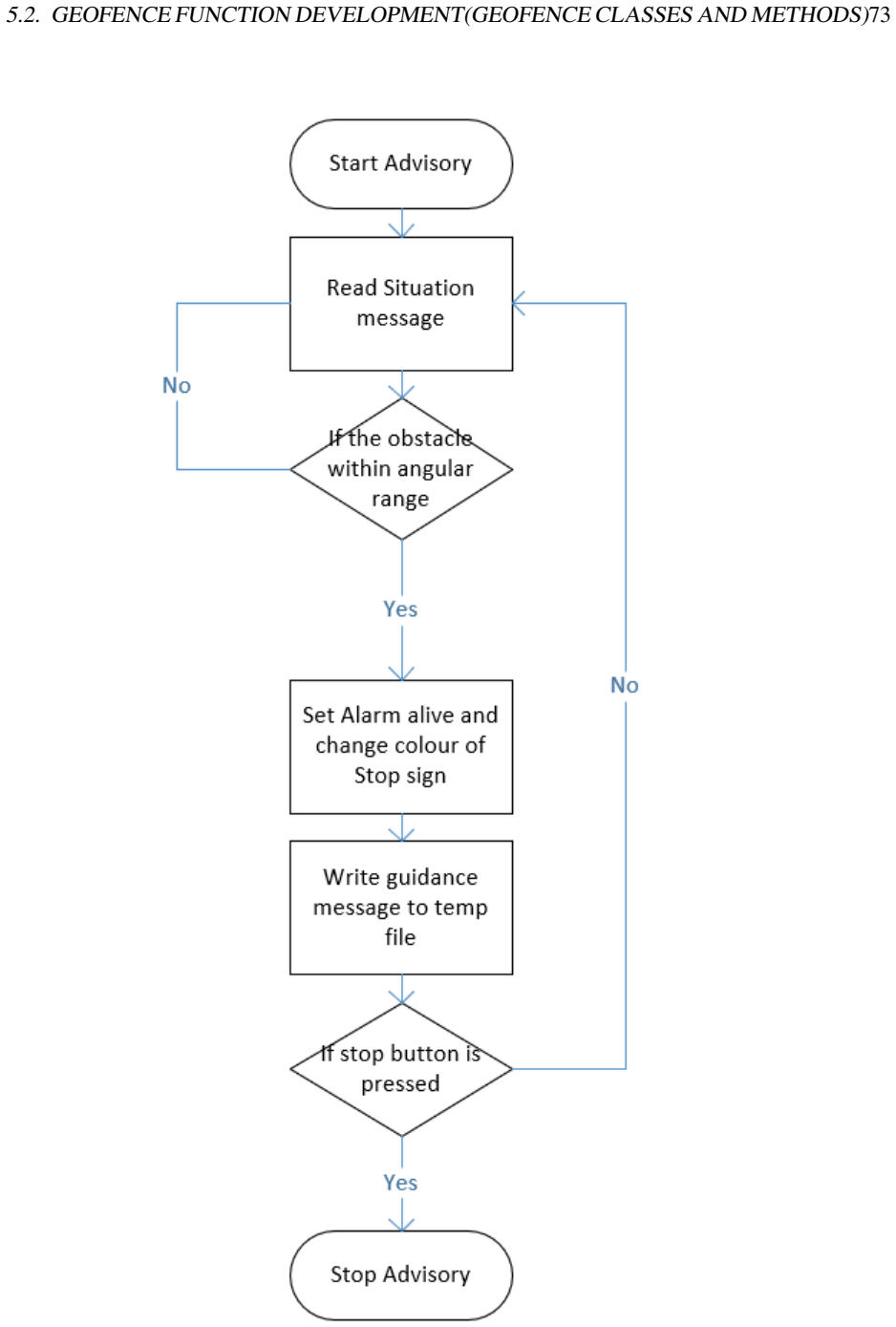
Figure 5.15. Figure 5.15: Visual alert from the advisory function The program will decide whether the advisory is triggered using the algorithms demon￾strated in Appendix C. The flowchart showing the decision-making process is in [PITH_FULL_IMAGE:figures/full_fig_p090_5_15.png] view at source ↗
Figure 5.16
Figure 5.16. Figure 5.16: Flowchart: The decision making for advisory alerts [PITH_FULL_IMAGE:figures/full_fig_p091_5_16.png] view at source ↗
Figure 5.17
Figure 5.17. Figure 5.17: Table relation of the Geofence Database The detail creation commands of all tables can be found in Appendix D [PITH_FULL_IMAGE:figures/full_fig_p093_5_17.png] view at source ↗
Figure 5.18
Figure 5.18. Figure 5.18: Example Database Diagram of the Geofence [PITH_FULL_IMAGE:figures/full_fig_p094_5_18.png] view at source ↗
Figure 6.1
Figure 6.1. Figure 6.1: Hardware Composition of the rig The testing platform is a NUC by Intel, detail specification: CPU: I7 5557U @3.1GHz Memory : 16 GB DDR3 1600MHz Drive : PCIe SSD [PITH_FULL_IMAGE:figures/full_fig_p098_6_1.png] view at source ↗
Figure 6.2
Figure 6.2. Figure 6.2: An Intel NUC[6] 6.2 Geo-fence software configuration 6.2.1 Required Software The Geofence software has its dependencies, which include the runtime and the database management system with spatial data extension. The following explicit software are required for compilation. Database : PostgreSQL v10 Database extension : PostGIS 2.4 Java SDK : Java SE 10 (jdk-10.0.2) The Java SDK is not required to run the … view at source ↗
Figure 6.3
Figure 6.3. Figure 6.3: Example of making a postgreSQL database for GIS data [PITH_FULL_IMAGE:figures/full_fig_p100_6_3.png] view at source ↗
Figure 6.4
Figure 6.4. Figure 6.4: A working snapshot of UAV display from simulation [PITH_FULL_IMAGE:figures/full_fig_p102_6_4.png] view at source ↗
Figure 6.5
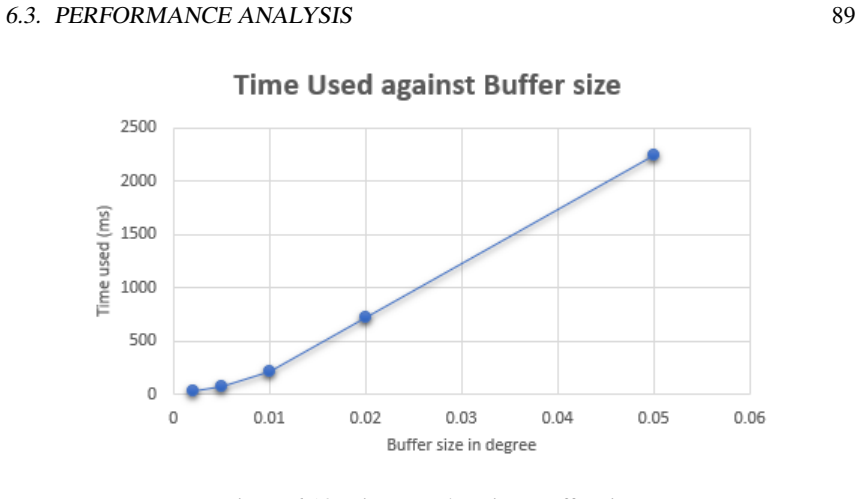
Figure 6.5. Figure 6.5: Test 2 Geofence Display 6.3 Performance Analysis The performance of the system consists of the hardware specification and algorithm. To analysis the performance on the different device, another PC is introduced, detail specifi￾cation is listed below : CPU: I7 4770 @3.4GHz Memory : 16 GB DDR3 1600MHz Drive : Kingston SHFS37A240G SSD The test procedure is to simulate the Geofence Software normal uses. In t… view at source ↗
Figure 6.6
Figure 6.6. Figure 6.6: The CPU time allocation of Geofence Software [PITH_FULL_IMAGE:figures/full_fig_p104_6_6.png] view at source ↗
Figure 6.7
Figure 6.7. Figure 6.7: Content inside loadUAV method execution Inside loadUAV method, in [PITH_FULL_IMAGE:figures/full_fig_p104_6_7.png] view at source ↗
Figure 6.8
Figure 6.8. Figure 6.8: The CPU time percentage allocation of database related operation [PITH_FULL_IMAGE:figures/full_fig_p105_6_8.png] view at source ↗
Figure 6.9
Figure 6.9. Figure 6.9: The average execution time of database related operation [PITH_FULL_IMAGE:figures/full_fig_p106_6_9.png] view at source ↗
Figure 6.10
Figure 6.10. Figure 6.10: Time Used against Buffer size [PITH_FULL_IMAGE:figures/full_fig_p107_6_10.png] view at source ↗
Figure 7.1
Figure 7.1. Figure 7.1: A example of 3D building construction[12] [PITH_FULL_IMAGE:figures/full_fig_p114_7_1.png] view at source ↗
read the original abstract

The Geofencing system is the key to operate the Unmanned Aerial Vehicle (UAV) within the safe and appropriate zone to avoid public concerns and other privacy issues. The system is designed to keep the UAV away from geofenced obstacles using the onboard GNSS and IMU location. The Geofencing system is part of the H2020 GAUSS project and facilities other subsystems, for instance, to support the command and control link, which is the security measure to secure the UAV from hijacking and signal spoofing. The regulatory authorities expressed the concern of having UAVs flying in the no-fly zone and causing troubles from offending private privacy to hazards at airport airspace. Hence the geofence system shall provide guidance message, which enables the UAV to evacuate from no-fly-zone, based on real-time updated location. This thesis aims to first illustrate the generation of geofence and then apply the geofence system on UAV operation. This application enables UAV to fly in the designated area without human intervention. The project is built with JAVA using GIS-enabled Database Management System and Open Soured Map data powered by OpenStreetMap and OS map. This method has been tested by simulations which had results of high accuracy.

Editorial analysis

A structured set of objections, weighed in public.

Desk editor's note, referee report, simulated authors' rebuttal, and a circularity audit. Tearing a paper down is the easy half of reading it; the pith above is the substance, this is the friction.

Referee Report

1 major / 2 minor

Summary. The manuscript describes a Java-based geofencing software system developed under the EU H2020 GAUSS project. It uses GIS-enabled database management and OpenStreetMap data to enforce UAV flight boundaries via real-time GNSS/IMU positioning, generating evacuation guidance messages to avoid no-fly zones. The central claim is that simulations of this system produced results of high accuracy, enabling autonomous UAV operation in designated areas without human intervention.

Significance. A reliable geofencing implementation could support UAV regulatory compliance and safety, particularly for command-and-control link protection. However, the complete absence of any evaluation methodology, metrics, or results prevents any assessment of whether the work advances the state of the art or meets its stated objectives.

major comments (1)
  1. [Abstract] Abstract: The assertion that 'This method has been tested by simulations which had results of high accuracy' is presented without any description of the simulation environment, sensor noise models, test scenarios (e.g., urban vs. airport boundaries), success criteria, quantitative metrics (position error, false-positive rate), or comparison baselines. This directly undermines the claim that the system 'enables UAV to fly in the designated area without human intervention.'
minor comments (2)
  1. [Abstract] Typo: 'Open Soured Map' should read 'Open Source Map'.
  2. [Abstract] Wording: 'facilities other subsystems' appears intended to be 'facilitates other subsystems'.

Simulated Author's Rebuttal

1 responses · 0 unresolved

We thank the referee for the detailed review of our manuscript describing the Java-based geofencing software system developed under the EU H2020 GAUSS project. We address the major comment below.

read point-by-point responses
  1. Referee: [Abstract] Abstract: The assertion that 'This method has been tested by simulations which had results of high accuracy' is presented without any description of the simulation environment, sensor noise models, test scenarios (e.g., urban vs. airport boundaries), success criteria, quantitative metrics (position error, false-positive rate), or comparison baselines. This directly undermines the claim that the system 'enables UAV to fly in the designated area without human intervention.'

    Authors: We agree that the abstract presents the simulation claim without supporting details on the environment, noise models, scenarios, criteria, or quantitative metrics. The manuscript primarily describes the system architecture, implementation in Java with GIS database and OpenStreetMap data, and the generation of evacuation guidance messages. No dedicated evaluation section with the requested elements is included. In a revision we will update the abstract to remove or qualify the 'high accuracy' claim and add a section describing the simulation setup, test scenarios, success criteria, and any available metrics such as position error. revision: yes

Circularity Check

0 steps flagged

No circularity; purely descriptive implementation paper

full rationale

The manuscript is a project description of a Java/GIS/OpenStreetMap geofencing system for UAVs. It contains no equations, derivations, parameters fitted to data then relabeled as predictions, self-citations used as load-bearing uniqueness theorems, or ansatzes smuggled via prior work. The sole accuracy claim is an unsupported direct assertion about simulation results; it does not reduce to any input by construction. This matches the default non-circular outcome for papers without formal derivation chains.

Axiom & Free-Parameter Ledger

0 free parameters · 2 axioms · 0 invented entities

The work rests on the unexamined premise that OpenStreetMap data and simulation environments are adequate proxies for real UAV operation; no free parameters or invented entities are introduced in the abstract.

axioms (2)
  • domain assumption OpenStreetMap and OS map data are sufficiently accurate and current for defining UAV no-fly zones
    The abstract states the system is powered by these sources without qualification or validation step.
  • domain assumption Simulation results transfer to real-world UAV behavior
    High accuracy is claimed from simulations alone.

pith-pipeline@v0.9.0 · 5740 in / 1344 out tokens · 26090 ms · 2026-05-25T15:50:16.579049+00:00 · methodology

discussion (0)

Sign in with ORCID, Apple, or X to comment. Anyone can read and Pith papers without signing in.

Reference graph

Works this paper leans on

24 extracted references · 24 canonical work pages

  1. [1]

    Raster to Polygon—Conversion toolbox — ArcGIS Desktop, 2018

    ArcGIS. Raster to Polygon—Conversion toolbox — ArcGIS Desktop, 2018

  2. [2]

    Geospatial Data Abstraction software Library, 2018

    GDAL/OGR contributors. Geospatial Data Abstraction software Library, 2018

  3. [3]

    TODAYonline — Standardise penalty regime, geo- fencing technology for bike-sharing operators, 2017

    EDW ARD LIM YEW SIH. TODAYonline — Standardise penalty regime, geo- fencing technology for bike-sharing operators, 2017

  4. [4]

    MBTiles Specification, 2018

    Eric Fischer, Konstantin Kaefer, Tom Macwright, Tom Miller, Paul Norman, Blake Thompson, and Will White. MBTiles Specification, 2018

  5. [5]

    Spatial functions in MySQL 5.6, MariaDB 5.5, PostGIS 2.0 and others

    Henrik Ingo. Spatial functions in MySQL 5.6, MariaDB 5.5, PostGIS 2.0 and others. Technical report, Nokia, 2013

  6. [6]

    Intel R⃝ NUC Kit NUC5i7RYH Product Specifications, 2015

    Intel. Intel R⃝ NUC Kit NUC5i7RYH Product Specifications, 2015

  7. [7]

    Space Images — SRTM Data Release for Eurasia, Index Map and Colored Height

    Jet Propulsion Laboratory. Space Images — SRTM Data Release for Eurasia, Index Map and Colored Height. Technical report, 2004

  8. [8]

    Course: Quality Management, DPT404 The V-Model

    Conny Johansson and Christian Bucanac. Course: Quality Management, DPT404 The V-Model. Technical report, 1999

  9. [9]

    Avionic Displays

    Branko Livada. Avionic Displays. Technical Report 4, 2012

  10. [10]

    Audio Warnings: Does the beep mean the coffee’s done

    Paul Novacek. Audio Warnings: Does the beep mean the coffee’s done. Avionics News, 2003

  11. [11]

    Open styles, map gallery, catography, 2018

    OpenMapTiles. Open styles, map gallery, catography, 2018. 99 100 REFERENCES

  12. [12]

    OpenStreetMap Component, 2017

    OpenStreetMap Contributors. OpenStreetMap Component, 2017

  13. [13]

    A Guide to Coordinate Systems in Great Britain V3.2

    Ordnance Survey. A Guide to Coordinate Systems in Great Britain V3.2. Technical report, 2018

  14. [14]

    National Grid Reference System, 2018

    Ordnance Survey. National Grid Reference System, 2018

  15. [15]

    737 Simulator Expanded Primary Flight Display (PFD), 2014

    PmFlight. 737 Simulator Expanded Primary Flight Display (PFD), 2014

  16. [16]

    Geo-Fencing for Unmanned Aerial Vehicle

    P L Pratyusha and V P S Naidu. Geo-Fencing for Unmanned Aerial Vehicle. Inter- national Journal of Computer Applications , (Ncesco):975–8887, 2015

  17. [17]

    Unmanned Aircraft System Operations in UK Airspace - Guidance

    Safety and Airspace Regulation Group. Unmanned Aircraft System Operations in UK Airspace - Guidance. Technical report, CAA, 2001

  18. [18]

    Electronic Centralized Aircraft Monitor (ECAM) - SKYbrary Aviation Safety

    SKYbrary. Electronic Centralized Aircraft Monitor (ECAM) - SKYbrary Aviation Safety. Technical report, 2018

  19. [19]

    Simon. St. Laurent and Michael Fitzgerald. XML pocket reference. O’Reilly, Se- bastopol Calif., 3rd ed. / edition, 2005

  20. [20]

    The Air Navigation Order 2016 and Regulations

    The Office of the General Counsel. The Air Navigation Order 2016 and Regulations. Technical report, CAA, 2016

  21. [21]

    Unmanned Aircraft System Airspace Integra- tion Plan

    United State Department of Defense. Unmanned Aircraft System Airspace Integra- tion Plan. Technical report, 2011

  22. [22]

    Government Accountability Office

    U.S. Government Accountability Office. GIS allows multiple layers of information to be displayed on a single map. 2018

  23. [23]

    DOM Standard, 2018

    WHATWG and World Wide Web Consortium. DOM Standard, 2018. Appendix A Test result of Intel NUC hardware platform Intel NUC test result of executing following SQL command using a series of buffer size: 1 d e l e t e from t e m p t a b l e ; 2 i n s e r t i n t o t e m p t a b l e ( osmid , geom , s t w i t h i n ) 3 s e l e c t osm id , geom , s t w i t h i...

  24. [24]

    , 49 0 . 0 0 0 0 1 , ’ q u a d s e g s =2 ’ ) ) ; 50 51 −− t h e uavgeom i s u n i q u e and i s u s e d a s t h e p r i m a r y k e y h e r e 52 a l t e r t a b l e u a v l o c a t i o n 53 add c o n s t r a i n t ” p k u a v l o c a t i o n ” primary key ( ” uavgeom ” ) ; 54 55 −− u a v m o t i o n t a b l e c o n t a i n s t h e uav h e a d i n g and v...