REVIEW 3 major objections 3 minor 44 references
StateLens: A Reverse Engineering Solution for Making Existing Dynamic Touchscreens Accessible
T0 review · 3 major / 3 minor · reviewed 2026-08-14 · deepseek-v4-flash
Pith's one-line read StateLens claims blind people can independently use unfamiliar dynamic touchscreens by reverse engineering their state diagrams from point-of-view videos and guiding each tap with audio and 3D-printed tools.
desk verdict A genuine systems contribution that makes dynamic touchscreen reverse engineering tractable, but the real-time state matcher is weaker than the offline F1s suggest. read the letter →
The pith
A machine-rendered reading of the paper's core claim, the machinery that carries it, and where it could break.
The reading
What carries the argument
The central object is the state diagram, a directed graph $G=(V,E,S,T)$ whose nodes are distinct screens of the device and whose edges are labeled by the button press that caused the transition. The machinery that builds it is a hybrid crowd-computer vision pipeline: an object-detection API finds and crops the screen region; SURF keypoints plus OCR text similarity match incoming frames to known states; a candidate-pool mechanism turns repeatedly observed unmatched frames into new states; and crowd workers supply labels, button locations, and descriptions. A second mechanism, the generated conversational agent, converts paths through the diagram into intents and required parameters, and the iOS app uses the diagram's adjacency to search nearby states first, keeping real-time state detection fast and stable. The 3D-printed finger cap and conductive stylus complete the interaction by letting a user explore a capacitive screen without triggering touches.
What would settle it
Take two consecutive screens of a real kiosk that differ only by a highlighted toggle or a color change, record hand-held point-of-view video under normal lighting with glare and finger motion, and run StateLens's state matcher on every frame after a button press; the claim would be falsified if the system frequently reports the previous state or wavers between states, because the guidance loop depends on knowing exactly which screen is showing.
Extended reading notes
Core claim
The discovery is that a dynamic touchscreen can be treated as a state machine and that this state machine can be recovered from ordinary point-of-view videos of people using the device. Each video frame is matched against known states using SURF feature matching, optical character recognition (OCR) similarity, and screen-region detection; unmatched frames are pooled and promoted to new states only after appearing consistently across about one second, which filters animation and transition noise. Crowd workers then label interaction components and descriptions, and fingertip touchpoints are detected to record which button caused each transition. The resulting directed graph $G=(V,E,S,T)$ is the reusable artifact: it enables neighbors-first state search that keeps detection latency and error roughly constant as the interface grows, it is converted into conversational-agent intents so users can prespecify tasks, and it powers the real-time audio feedback that guides a user's finger to the right button. The user study portions claim the whole loop works: with the conversational agent, the iOS app, and the 3D-printed accessories, 14 blind participants achieved 94.7% task completion.
Load-bearing premise
The load-bearing premise is that the phone camera image of the current screen can be matched reliably and quickly to the correct state in the diagram using SURF features, OCR, and the stored reference images; if glare, motion blur, or screens that differ only by a toggle or color break this match, the audio guidance points to the wrong button.
Editorial extensions
If this is right
- Blind users can independently complete multi-step tasks on unfamiliar public touchscreens once a state diagram exists, as demonstrated by the 94.7% task completion rate in the user study.
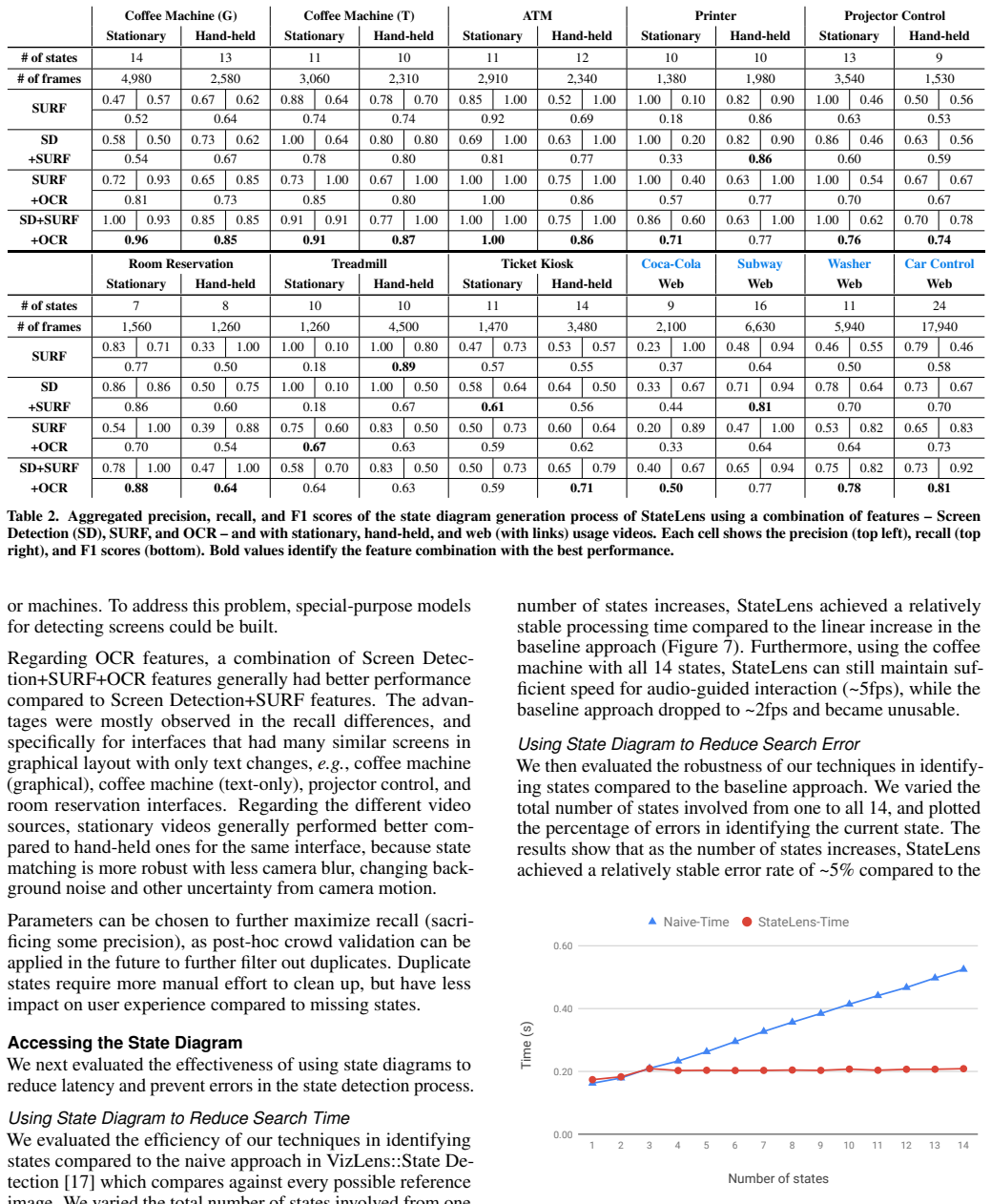
- State-diagram-guided search keeps detection time near 5 frames per second and error near 5% even as the number of states grows to 14, where a naive compare-against-all baseline degrades to about 2 frames per second with rising errors.
- The approach works from multiple video sources, including online demo videos, so a device's structure can be bootstrapped without physical access to that device.
- Because the conversational agent is generated automatically from the diagram, users can prespecify a task before touching the screen, reducing the physical and cognitive effort of exploring an unfamiliar interface.
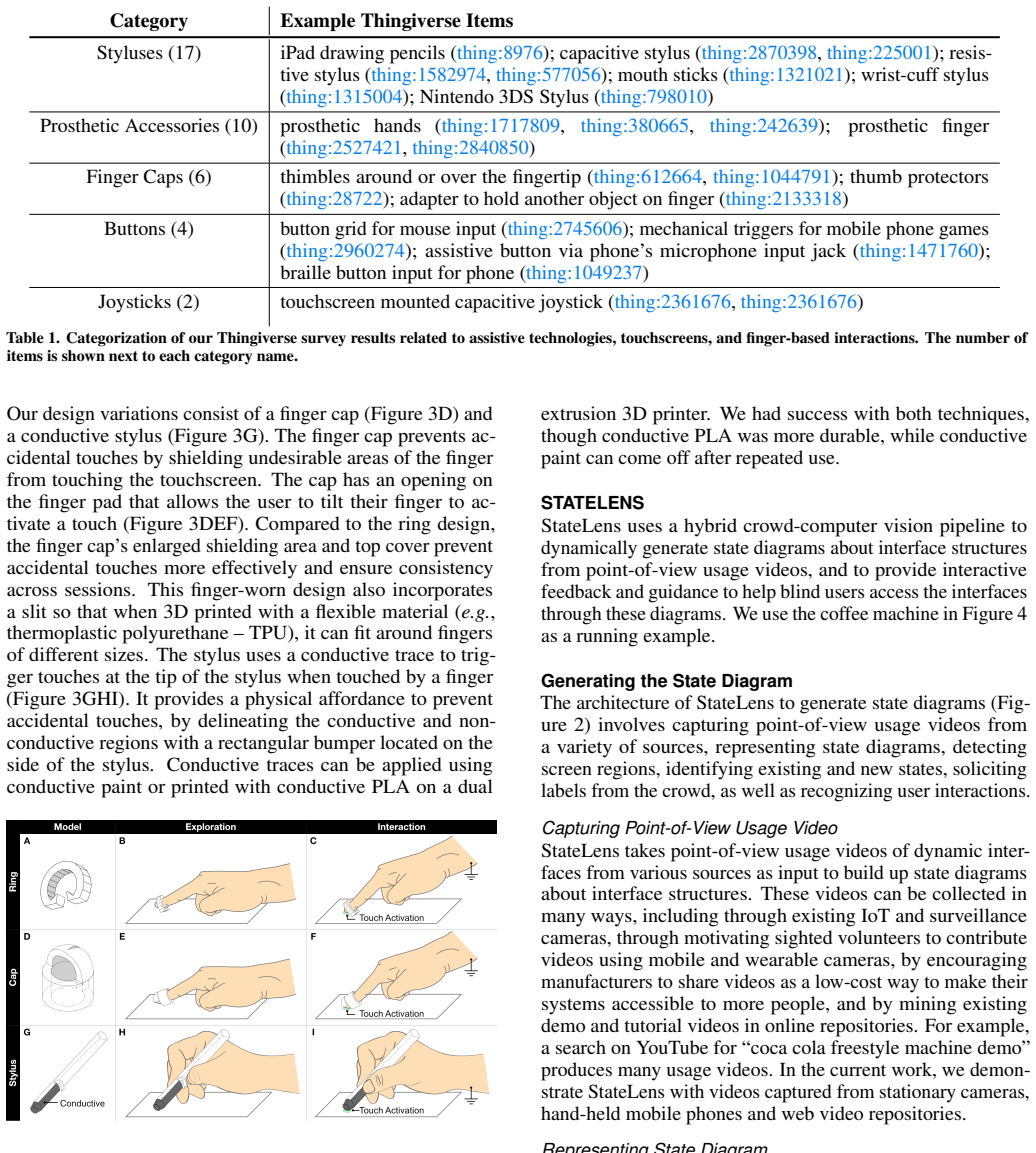
- 3D-printed accessories transfer risk-free exploration to unmodified capacitive touchscreens, so users can learn the layout without accidentally triggering actions.
Reading between the lines
- If state diagrams were accumulated into a shared, geo-located repository, a new device could inherit a nearby or similar device's diagram; the paper sketches a queryable map, but the transfer-learning step is our extrapolation.
- The same diagram, which separates what is on the screen from how to move between screens, could also support sighted users through augmented-reality overlays, foreign-language kiosk translation, or first-time tutorials for unfamiliar machines.
- The limitations the paper reports, such as toggle buttons, color-only changes, scroll and swipe gestures, and the last-meter problem of exact activation, suggest that adding widget-specific change detectors and automatic actuation hardware would be the natural next step toward real-world robustness.
- The lab result of roughly 5% state-identification error is likely optimistic under field conditions; a deployment study that measures how often the audio guidance points at the wrong button per completed task would reveal the practical ceiling of the approach.
Signed reviews
Editorial analysis
A structured set of objections, weighed in public.
Referee Report
Summary. StateLens aims to make dynamic touchscreen interfaces accessible to blind users by reverse engineering the underlying state diagram from point-of-view usage videos, automatically generating a conversational agent from that diagram, and providing real-time audio guidance through an iOS application plus 3D-printed accessories for risk-free exploration of capacitive screens. The technical evaluation reports state-diagram reconstruction scores across stationary, hand-held, and web videos using combinations of screen detection, SURF, and OCR features, and a user study with 14 blind participants reports a 94.7% task completion rate and high subjective ratings. The paper concludes that StateLens is the first system to enable blind users to access dynamic touchscreens in the wild.
Significance. If the claims hold, this is a significant contribution to accessibility research and to the reverse engineering of physical user interfaces. The paper's strengths include the hybrid crowd-computer vision pipeline, the breadth of the technical evaluation across twelve interfaces and multiple video sources, the release of the 3D-printed accessory models, and the explicit discussion of limitations. The evaluation evidence is meaningful, but the gap between the offline pipeline whose accuracy is reported and the real-time SURF-only path that actually drives user feedback, together with the simulation-only user study, leaves the central in-the-wild claim not fully supported.
major comments (3)
- [Identifying States Efficiently and Robustly; Technical Evaluation, Table 2] The runtime state identification that drives user-facing feedback uses only SURF features, while the headline reconstruction results in Table 2 are for the Screen Detection+SURF+OCR configuration. The paper states in the section 'Identifying States Efficiently and Robustly' that 'for performance reasons, only SURF features are used when detecting states to provide real-time feedback for blind users,' because screen detection and OCR have delays of about one second. The SURF-only configuration reports markedly lower reconstruction F1 for several interfaces; for example, the stationary graphical coffee-machine video shows SURF-only F1=0.52 versus 0.96 for SD+SURF+OCR. Since the deployed guidance loop is exactly the SURF-only matcher, the offline F1 results do not directly characterize the real-time system's accuracy or its failure modes under motion blur, glare, or text-only state changes. Please evaluate the SURF-only real-time matcher on the full 28-video corpus with per-interface accuracy and latency, or demonstrate that a cached or parallelized use of OCR and screen detection can meet the real-time budget.
- [User Evaluation, Apparatus and Participants; Discussion and Future Work, Limitations] The user study that supports the claim of successfully enabling blind users to access dynamic touchscreens was conducted on an InVision simulation of a coffee machine displayed on an iPad, not on a real physical touchscreen appliance, and the Limitations section acknowledges that 'we did not deeply study how StateLens works in the real world.' Given that the abstract and introduction repeatedly emphasize in-the-wild access, the simulation-only study leaves a load-bearing gap: it does not test how the SURF-only runtime matcher, the head-mounted camera, and the 3D-printed accessories perform under real-world lighting, glare, occlusion, and screen variability. A small deployment study with at least one real appliance, even with a subset of tasks, would provide direct evidence for the central claim.
- [Technical Evaluation, Generating the State Diagram; Detecting the Screen; Identifying Existing States] The system depends on several explicitly listed thresholds and design parameters, including the screen bounding box size threshold of 10% of the image, the object detection confidence threshold of 55%, the candidate pool time window of one second, the SURF inlier-ratio threshold, the OCR LCS edit-distance threshold, and the color-marker placement on the accessories. No sensitivity analysis over these parameters is reported, so the F1 scores in Table 2 and the error rates in Figure 8 are only known for a single parameter set. A sensitivity analysis over plausible ranges of the most influential thresholds, or a justification of the chosen values, is needed to show that the results are not artifacts of a particular tuning.
minor comments (3)
- [Related Work] There is a typo in the Related Work section: 'sceenshots' should be 'screenshots'.
- [Technical Evaluation, Table 2] Table 2 is extremely dense, with precision, recall, and F1 for ten or more subcolumns in each row; splitting the table into separate stationary, hand-held, and web panels, or plotting the results, would substantially improve readability and make the comparisons easier to verify.
- [Technical Evaluation, Figure 8] Figure 8 reports error rates as percentages without confidence intervals or a precise definition of how an error was labeled relative to ground-truth state; please clarify the error metric and add variability information.
Circularity Check
No significant circularity; central claims are empirically evaluated against manually coded ground truth and external baselines.
full rationale
StateLens is an empirical systems paper rather than a derivational one. The central claims—that state diagrams can be reconstructed from point-of-view videos and that the resulting app helps blind users—are validated against external evidence: Table 2 reports precision/recall/F1 against researcher-coded ground truth for four feature configurations; Figures 7–8 compare state-detection time and error against a naive VizLens baseline; and the user study uses 14 blind participants with recorded completion (94.7%) and Likert ratings. The self-citations to VizLens are for workflow inheritance and as the baseline comparator, not as a proof source for StateLens's central functionality, and no uniqueness theorem or fitted parameter is imported to force the result. The paper's own Limitations passage explicitly concedes that StateLens has limited ability to differentiate toggles/color indicators and was not deeply studied in the real world; these are honest scoping statements, not circularities. The skeptic's concern that the deployed runtime matcher uses SURF only, whereas the high-F1 pipeline includes OCR and screen detection, is a correctness or robustness risk about whether lab evaluation transfers to the field; it does not make any prediction equivalent to its input by construction. No circular step can be quoted, so the score is 0.
Assumptions & free parameters
free parameters (6)
- Screen bounding box size threshold =
10% of image size
- Object detection confidence threshold =
55%
- Candidate pool time window =
1 second
- SURF inlier ratio threshold
- OCR LCS edit distance similarity threshold
- Color marker placement on accessories
assumptions (5)
- domain assumption The visual appearance of the interface, via SURF features and OCR text, is sufficient to uniquely identify the current state.
- domain assumption Point-of-view usage videos capture the interface with enough quality and coverage to reconstruct all states a blind user might need.
- domain assumption Crowd workers can accurately label interface regions and interaction components from video frames.
- domain assumption The 3D-printed accessories maintain a consistent touchpoint between exploration and activation.
- domain assumption The interface responds to discrete button presses, not continuous gestures.
Cite this review
Pith. "Pith review of StateLens: A Reverse Engineering Solution for Making Existing Dynamic Touchscreens Accessible." pith.science (2026). https://pith.science/paper/GHHOLYUR
@misc{pith2026190807144,
  author       = {Pith},
  title        = {Pith review of: StateLens: A Reverse Engineering Solution for Making Existing Dynamic Touchscreens Accessible},
  year         = {2026},
  howpublished = {\url{https://pith.science/paper/GHHOLYUR}},
  note         = {Machine review of arXiv:1908.07144}
}
read the original abstract
Blind people frequently encounter inaccessible dynamic touchscreens in their everyday lives that are difficult, frustrating, and often impossible to use independently. Touchscreens are often the only way to control everything from coffee machines and payment terminals, to subway ticket machines and in-flight entertainment systems. Interacting with dynamic touchscreens is difficult non-visually because the visual user interfaces change, interactions often occur over multiple different screens, and it is easy to accidentally trigger interface actions while exploring the screen. To solve these problems, we introduce StateLens - a three-part reverse engineering solution that makes existing dynamic touchscreens accessible. First, StateLens reverse engineers the underlying state diagrams of existing interfaces using point-of-view videos found online or taken by users using a hybrid crowd-computer vision pipeline. Second, using the state diagrams, StateLens automatically generates conversational agents to guide blind users through specifying the tasks that the interface can perform, allowing the StateLens iOS application to provide interactive guidance and feedback so that blind users can access the interface. Finally, a set of 3D-printed accessories enable blind people to explore capacitive touchscreens without the risk of triggering accidental touches on the interface. Our technical evaluation shows that StateLens can accurately reconstruct interfaces from stationary, hand-held, and web videos; and, a user study of the complete system demonstrates that StateLens successfully enables blind users to access otherwise inaccessible dynamic touchscreens.
Figures


Figures from the paper (5 more)



Reference graph
Works this paper leans on
-
[1]
Amazon Web Services, Inc. 2019. Amazon Rekognition. (2019). https://aws.amazon.com/rekognition/
work page 2019
-
[2]
Nikola Banovic, Tovi Grossman, Justin Matejka, and George Fitzmaurice. 2012. Waken: Reverse Engineering Usage Information and Interface Structure from Software Videos. In Proceedings of the 25th Annual ACM Symposium on User Interface Software and Technology (UIST ’12). ACM, New York, NY , USA. DOI:http://dx.doi.org/10.1145/2380116.2380129
arXiv 2012
-
[3]
Herbert Bay, Tinne Tuytelaars, and Luc Van Gool. 2006. SURF: Speeded Up Robust Features. In Computer Vision – ECCV 2006, Aleš Leonardis, Horst Bischof, and Axel Pinz (Eds.). Springer Berlin Heidelberg, Berlin, Heidelberg, 404–417
work page 2006
- [4]
-
[5]
Hugh Beyer and Karen Holtzblatt. 1997. Contextual design: defining customer-centered systems. Elsevier
work page 1997
-
[6]
Bigham, Chandrika Jayant, Hanjie Ji, Greg Little, Andrew Miller, Robert C
Jeffrey P. Bigham, Chandrika Jayant, Hanjie Ji, Greg Little, Andrew Miller, Robert C. Miller, Robin Miller, Aubrey Tatarowicz, Brandyn White, Samual White, and Tom Yeh. 2010. VizWiz: Nearly Real-time Answers to Visual Questions. In Proceedings of the 23Nd Annual ACM Symposium on User Interface Software and Technology (UIST ’10). ACM, New York, NY , USA, 3...
arXiv 2010
-
[7]
Meera M Blattner, Denise A Sumikawa, and Robert M Greenberg. 1989. Earcons and icons: Their structure and common design principles. Human–Computer Interaction 4, 1 (1989), 11–44
work page 1989
-
[8]
Erin Brady, Meredith Ringel Morris, Yu Zhong, Samuel White, and Jeffrey P. Bigham. 2013. Visual Challenges in the Everyday Lives of Blind People. In Proceedings of the SIGCHI Conference on Human Factors in Computing Systems (CHI ’13). ACM, New York, NY , USA, 2117–2126. DOI: http://dx.doi.org/10.1145/2470654.2481291
arXiv 2013
Show all 44 references
-
[9]
Tsung-Hsiang Chang, Tom Yeh, and Rob Miller. 2011. Associating the Visual Representation of User Interfaces with Their Internal Structures and Metadata. In Proceedings of the 24th Annual ACM Symposium on User Interface Software and Technology (UIST ’11). ACM, New York, NY , US...
2011
-
[10]
Xiang ‘Anthony’ Chen, Jeeeun Kim, Jennifer Mankoff, Tovi Grossman, Stelian Coros, and Scott E. Hudson
-
[11]
Antonio Criminisi, Ian Reid, and Andrew Zisserman
-
[12]
Morgan Dixon and James Fogarty. 2010. Prefab: Implementing Advanced Behaviors Using Pixel-based Reverse Engineering of Interface Structure. In Proceedings of the SIGCHI Conference on Human Factors in Computing Systems (CHI ’10). ACM, New York, NY , USA, 1525–1534.DOI: http://d...
2010
-
[13]
Fischler and Robert C
Martin A. Fischler and Robert C. Bolles. 1981. Random sample consensus: A paradigm for model fitting with applications to image analysis and automated cartography. Commun. ACM 24, 6 (June 1981), 381–395. DOI:http://dx.doi.org/10.1145/358669.358692
1981
-
[14]
Ladner, and James M
Giovanni Fusco, Ender Tekin, Richard E. Ladner, and James M. Coughlan. 2014. Using Computer Vision to Access Appliance Displays. In Proceedings of the 16th International ACM SIGACCESS Conference on Computers & Accessibility (ASSETS ’14). ACM, New York, NY , USA, 281–282.DOI: h...
2014
-
[15]
Google. 2019. Dialogflow. (2019). https://dialogflow.com
2019
-
[16]
Google Cloud. 2019. Cloud Vision. (2019). https://cloud.google.com/vision/
2019
-
[17]
Anhong Guo, Xiang ‘Anthony’ Chen, Haoran Qi, Samuel White, Suman Ghosh, Chieko Asakawa, and Jeffrey P. Bigham. 2016. VizLens: A robust and interactive screen reader for interfaces in the real world. In Proceedings of the 29th Annual Symposium on User Interface Software and Tec...
2016
-
[19]
Anhong Guo, Saige McVea, Xu Wang, Patrick Clary, Ken Goldman, Yang Li, Yu Zhong, and Jeffrey P. Bigham. 2018. Investigating Cursor-based Interactions to Support Non-Visual Exploration in the Real World. In Proceedings of the 20th International ACM SIGACCESS Conference on Compu...
2018
-
[20]
Stangl, Anhong Guo, Chi Lin, Kristen Grauman, Jiebo Luo, and Jeffrey P
Danna Gurari, Qing Li, Abigale J. Stangl, Anhong Guo, Chi Lin, Kristen Grauman, Jiebo Luo, and Jeffrey P. Bigham. 2018. VizWiz Grand Challenge: Answering Visual Questions from Blind People. In Proceedings of the IEEE Conference on Computer Vision and Pattern Recognition. 3608–3617
2018
-
[22]
Hudson, and Jennifer Mankoff
Amy Hurst, Scott E. Hudson, and Jennifer Mankoff
-
[23]
InVisionApp Inc. 2019. InVision. (2019). https://www.invisionapp.com
2019
-
[24]
Kane, Jeffrey P
Shaun K. Kane, Jeffrey P. Bigham, and Jacob O. Wobbrock. 2008. Slide Rule: Making Mobile Touch Screens Accessible to Blind People Using Multi-touch Interaction Techniques. In Proceedings of the 10th International ACM SIGACCESS Conference on Computers and Accessibility (Assets ...
2008
-
[25]
Guo, Robert C
Juho Kim, Phu Tran Nguyen, Sarah Weir, Philip J. Guo, Robert C. Miller, and Krzysztof Z. Gajos. 2014. Crowdsourcing Step-by-step Information Extraction to Enhance Existing How-to Videos. In Proceedings of the 32Nd Annual ACM Conference on Human Factors in Computing Systems (CH...
2014
-
[26]
Benjamin Lafreniere, Tovi Grossman, and George Fitzmaurice. 2013. Community Enhanced Tutorials: Improving Tutorials with Multiple Demonstrations. In Proceedings of the SIGCHI Conference on Human Factors in Computing Systems (CHI ’13). ACM, New York, NY , USA, 1779–1788.DOI: ht...
2013
-
[27]
Lasecki, Phyo Thiha, Yu Zhong, Erin Brady, and Jeffrey P
Walter S. Lasecki, Phyo Thiha, Yu Zhong, Erin Brady, and Jeffrey P. Bigham. 2013. Answering Visual Questions with Conversational Crowd Assistants. In Proceedings of the 15th International ACM SIGACCESS Conference on Computers and Accessibility (ASSETS ’13). ACM, New York, NY ,...
2013
-
[28]
Toby Jia-Jun Li, Amos Azaria, and Brad A. Myers
-
[29]
Yang Li, Xiang Cao, Katherine Everitt, Morgan Dixon, and James A. Landay. 2010. FrameWire: A Tool for Automatically Extracting Interaction Logic from Paper Prototyping Tests. In Proceedings of the SIGCHI Conference on Human Factors in Computing Systems (CHI ’10). ACM, New York...
2010
-
[30]
Morris, P
T. Morris, P. Blenkhorn, L. Crossey, Q. Ngo, M. Ross, D. Werner, and C. Wong. 2006. Clearspeech: A Display Reader for the Visually Handicapped. IEEE Transactions on Neural Systems and Rehabilitation Engineering 14, 4 (Dec 2006), 492–500. DOI: http://dx.doi.org/10.1109/TNSRE.20...
2006
-
[31]
Raf Ramakers, Fraser Anderson, Tovi Grossman, and George Fitzmaurice. 2016. RetroFab: A design tool for retrofitting physical interfaces using actuators, sensors and 3D printing. In Proceedings of the 2016 CHI Conference on Human Factors in Computing Systems (CHI ’16). ACM, New...
2016
-
[32]
Amanda Swearngin and Yang Li. 2019. Modeling Mobile Interface Tappability Using Crowdsourcing and Deep Learning. In Proceedings of the 2019 CHI Conference on Human Factors in Computing Systems (CHI ’19). ACM, New York, NY , USA, Article 75, 11 pages. DOI:http://dx.doi.org/10.1...
2019
-
[33]
Coughlan, and Huiying Shen
Ender Tekin, James M. Coughlan, and Huiying Shen
-
[34]
Gregg Vanderheiden and Jutta Treviranus. 2011. Creating a Global Public Inclusive Infrastructure. In Proceedings of the 6th International Conference on Universal Access in Human-computer Interaction: Design for All and eInclusion - Volume Part I (UAHCI’11). Springer-Verlag, Be...
2011
-
[35]
Vanderheiden
Gregg C. Vanderheiden. 2000. Flexible access system for touch screen devices. (April 11 2000). US Patent 6,049,328
2000
-
[36]
Vladimir Vezhnevets, Vassili Sazonov, and Alla Andreeva. 2003. A Survey on Pixel-Based Skin Color Detection Techniques. In Proceedings of GraphiCon. 85–92
2003
-
[37]
Xu Wang, Benjamin Lafreniere, and Tovi Grossman
-
[38]
Tom Yeh, Tsung-Hsiang Chang, and Robert C. Miller
-
[39]
Wobbrock
Xiaoyi Zhang, Anne Spencer Ross, Anat Caspi, James Fogarty, and Jacob O. Wobbrock. 2017. Interaction Proxies for Runtime Repair and Enhancement of Mobile Application Accessibility. In Proceedings of the 2017 CHI Conference on Human Factors in Computing Systems (CHI ’17). ACM, ...
2017
-
[40]
Lasecki, Erin Brady, and Jeffrey P
Yu Zhong, Walter S. Lasecki, Erin Brady, and Jeffrey P. Bigham. 2015. RegionSpeak: Quick Comprehensive Spatial Descriptions of Complex Images for Blind Users. In Proceedings of the 33rd Annual ACM Conference on Human Factors in Computing Systems (CHI ’15). ACM, New York, NY , ...
2015
-
[1999]
Image and Vision Computing 17, 8 (1999), 625–634
A plane measuring device. Image and Vision Computing 17, 8 (1999), 625–634
1999
-
[2009]
In Proceedings of the 22Nd Annual ACM Symposium on User Interface Software and Technology (UIST ’09)
Sikuli: Using GUI Screenshots for Search and Automation. In Proceedings of the 22Nd Annual ACM Symposium on User Interface Software and Technology (UIST ’09). ACM, New York, NY , USA, 183–192.DOI: http://dx.doi.org/10.1145/1622176.1622213
-
[2010]
InProceedings of the 15th International Conference on Intelligent User Interfaces (IUI ’10)
Automatically Identifying Targets Users Interact with During Real World Tasks. InProceedings of the 15th International Conference on Intelligent User Interfaces (IUI ’10). ACM, New York, NY , USA, 11–20. DOI:http://dx.doi.org/10.1145/1719970.1719973
-
[2011]
In Proceedings of the 2011 IEEE Workshop on Applications of Computer Vision (WACV) (WACV ’11)
Real-time Detection and Reading of LED/LCD Displays for Visually Impaired Persons. In Proceedings of the 2011 IEEE Workshop on Applications of Computer Vision (WACV) (WACV ’11). IEEE Computer Society, Washington, DC, USA, 491–496. DOI: http://dx.doi.org/10.1109/WACV.2011.5711544
2011
-
[2017]
In Proceedings of the 2017 CHI Conference on Human Factors in Computing Systems (CHI ’17)
SUGILITE: Creating Multimodal Smartphone Automation by Demonstration. In Proceedings of the 2017 CHI Conference on Human Factors in Computing Systems (CHI ’17). ACM, New York, NY , USA, 6038–6049. DOI: http://dx.doi.org/10.1145/3025453.3025483
2017
-
[2018]
In Proceedings of the 2018 CHI Conference on Human Factors in Computing Systems (CHI ’18)
Leveraging Community-Generated Videos and Command Logs to Classify and Recommend Software Workflows. In Proceedings of the 2018 CHI Conference on Human Factors in Computing Systems (CHI ’18). ACM, New York, NY , USA, Article 285, 13 pages.DOI: http://dx.doi.org/10.1145/3173574.3173859
2018
Reviewed August 14, 2026 · model on record in the stance chip above.
Discussion (0). Continue with ORCID to comment.