OpenPodcar2: a robust, ROS2 vehicle for self-driving research
Pith reviewed 2026-05-08 02:55 UTC · model grok-4.3
The pith
OpenPodcar2 turns a mobility scooter into a robust low-cost ROS2 autonomous vehicle for research and deployment.
A machine-rendered reading of the paper's core claim, the machinery that carries it, and where it could break.
Core claim
OpenPodcar2 is a robust, ROS2-interfaced, low-cost, open source hardware and software autonomous vehicle platform based on an off-the-shelf hard-canopy mobility scooter donor vehicle, extended with electronics and ROS2 interfacing to enable research and potential deployment use cases, providing a balance between real world utility, safety, cost and robustness.
What carries the argument
The common ROS2 interface provided by the OSH R4 mechatronics board integration and Gazebo simulation, combined with the nav2 stack for SLAM and command enactment to drive the vehicle.
If this is right
- It can transport a human passenger or similar load at speeds up to 15km/h.
- It supports use as a last-mile autonomous taxi service or to transport delivery containers around a city center.
- It is small and safe enough to be parked in a standard research lab.
- It has a total build cost of around 7,000USD from new components, or 2,000USD with a used donor vehicle.
Where Pith is reading between the lines
- Other researchers could replicate or extend the platform for their own experiments in outdoor navigation.
- The open-source documentation may encourage similar low-cost adaptations of everyday vehicles for robotics.
- Testing in varied environments could reveal how well the robustness holds for longer deployments.
- The platform might serve as a testbed for studying human-robot interaction in passenger transport scenarios.
Load-bearing premise
The hardware modifications, ROS2 integration, and nav2 stack produce a system that is robust enough for both research and potential deployment use cases without major failures in real-world conditions.
What would settle it
A series of real-world tests where the vehicle experiences repeated navigation failures, safety incidents, or hardware breakdowns while attempting to drive around obstacles to a target pose.
Figures














read the original abstract
OpenPodcar2 is a robust, ROS2-interfaced, low-cost, open source hardware and software, autonomous vehicle platform based on an off-the-shelf, hard-canopy, mobility scooter donor vehicle. It is a modification of the previous OpenPodcar design, which extends it with robust electronics and ROS2 interfacing, to enable both research and also potential deployment use cases. The platform consists of (a) hardware components: documented as a bill of materials and build instructions; (b) integration to the general purpose OSH R4 mechatronics board and a Gazebo simulation of the vehicle, both presenting a common ROS2 interface (c) higher-level ROS2 software implementations and configurations of standard robot autonomous planning and control, including the nav2 stack which performs SLAM and enacts commands to drive the vehicle from a current to a desired pose around obstacles. OpenPodcar2 can transport a human passenger or similar load at speeds up to 15km/h, for example for use as a last-mile autonomous taxi service or to transport delivery containers similarly around a city center. It is small and safe enough to be parked in a standard research lab robust enough for some deployment cases. Total build cost was around 7,000USD from new components, or 2,000USD with a used Donor Vehicle. OpenPodcar2 thus provides a research balance between real world utility, safety, cost and robustness.
Editorial analysis
A structured set of objections, weighed in public.
Referee Report
Summary. The paper describes OpenPodcar2, an open-source autonomous vehicle platform derived from an off-the-shelf mobility scooter. It details a bill of materials and build instructions for hardware modifications, integration with the OSH R4 mechatronics board, a Gazebo simulation sharing a ROS2 interface, and configurations of the nav2 stack for SLAM, obstacle-aware planning, and control. The platform is positioned as low-cost (approximately $2,000–$7,000), capable of transporting a passenger or load at up to 15 km/h, and providing a balance of real-world utility, safety, cost, and robustness suitable for both research experiments and limited deployment scenarios such as last-mile services.
Significance. If the hardware and software integration function as described, the work would supply a reproducible, affordable hardware testbed that lowers the barrier for self-driving research in resource-constrained labs. The explicit provision of a common ROS2 interface, Gazebo model, and nav2 configurations is a concrete strength that supports extension and comparison with other platforms. The significance for deployment claims, however, is constrained by the absence of any reported performance data.
major comments (1)
- [Abstract and §5] Abstract and §5 (Evaluation/Results): the central claim that OpenPodcar2 is 'robust enough for some deployment cases' and 'provides a research balance between real world utility, safety, cost and robustness' is load-bearing yet unsupported by quantitative evidence. The manuscript supplies BOM, build instructions, simulation, and nav2 configurations, but reports no navigation success rates across trials, logged interventions, uptime statistics, payload effects, or identified failure modes (e.g., at 15 km/h or on uneven surfaces). Without such data the robustness assertion rests on design intent and standard-stack usage rather than demonstrated behavior.
minor comments (2)
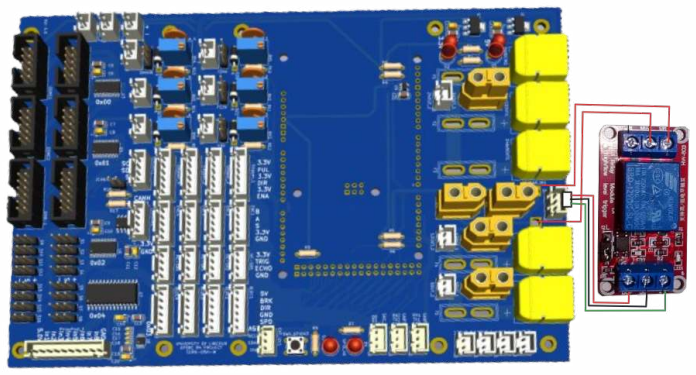
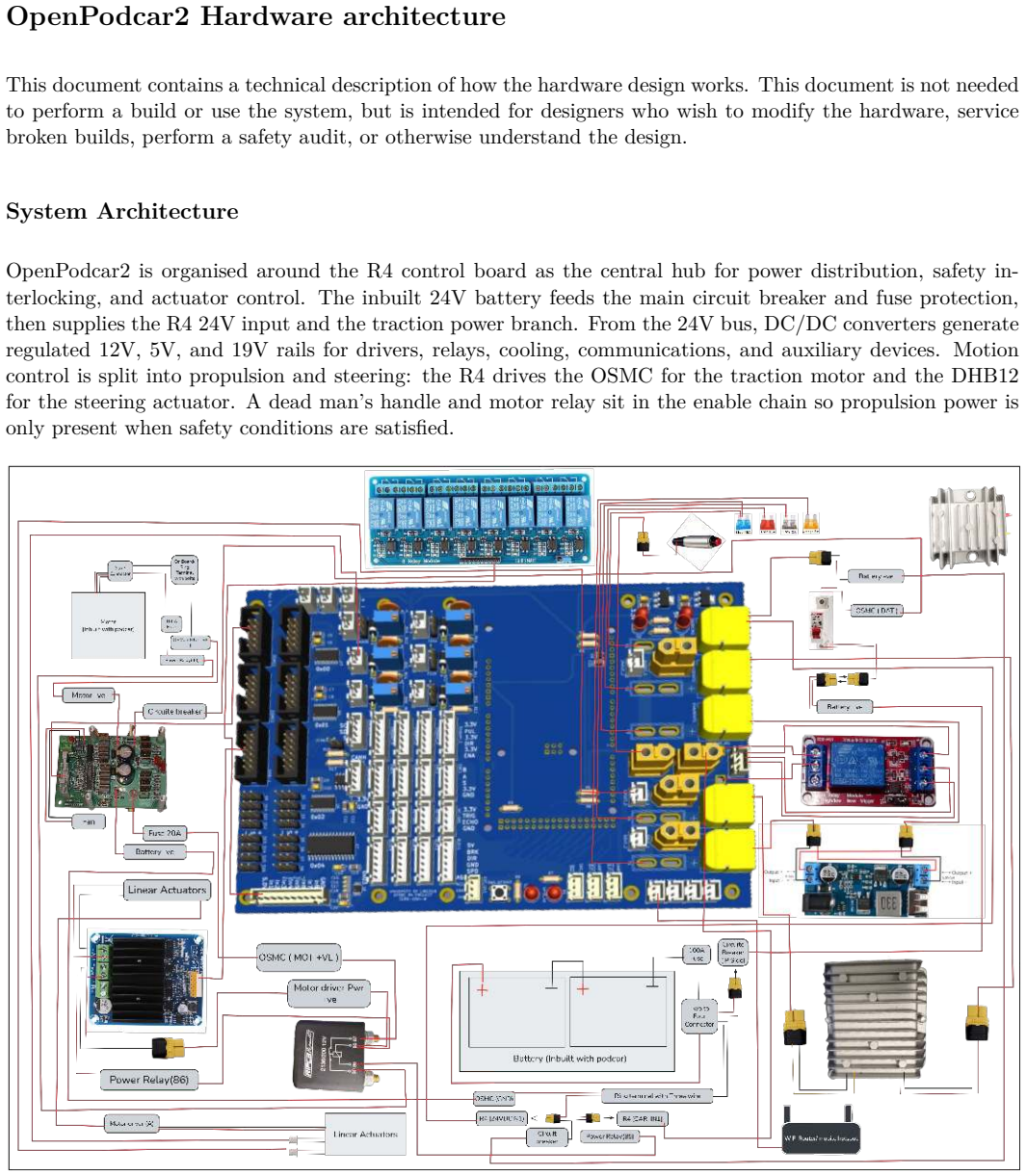
- [Figure captions and §3] Figure captions and §3 (Hardware): the wiring diagram and component labels could be expanded to explicitly map each element to the corresponding ROS2 topic or driver node, improving reproducibility for readers replicating the build.
- [§4] §4 (Software): the description of the nav2 parameter files would benefit from a short table listing the key tuned values (e.g., controller gains, costmap inflation radii) rather than referring readers only to the repository.
Simulated Author's Rebuttal
We thank the referee for their constructive review and for recognizing the value of the open-source platform, hardware documentation, simulation, and ROS2 integration. We address the single major comment below.
read point-by-point responses
-
Referee: [Abstract and §5] Abstract and §5 (Evaluation/Results): the central claim that OpenPodcar2 is 'robust enough for some deployment cases' and 'provides a research balance between real world utility, safety, cost and robustness' is load-bearing yet unsupported by quantitative evidence. The manuscript supplies BOM, build instructions, simulation, and nav2 configurations, but reports no navigation success rates across trials, logged interventions, uptime statistics, payload effects, or identified failure modes (e.g., at 15 km/h or on uneven surfaces). Without such data the robustness assertion rests on design intent and standard-stack usage rather than demonstrated behavior.
Authors: We agree that the manuscript does not contain quantitative performance data from real-world trials to substantiate the robustness and deployment claims. The contribution centers on the documented hardware modifications, OSH R4 integration, Gazebo model with shared ROS2 interface, and nav2 configurations rather than empirical evaluation. We will revise the abstract and §5 to remove or qualify the unsupported assertions (e.g., changing 'robust enough for some deployment cases' to language that reflects design intent and component choices). A limitations paragraph will be added noting the absence of trial statistics and identifying field validation as future work. These changes will appear in the revised manuscript. revision: yes
Circularity Check
No circularity: purely descriptive systems report with no derivations or fitted predictions
full rationale
The paper is a descriptive systems report detailing hardware modifications, ROS2 integration, bill of materials, build instructions, Gazebo simulation, and nav2 stack configurations for an autonomous mobility scooter platform. It contains no mathematical derivations, equations, parameter fitting, predictions of new quantities, or uniqueness theorems. The central claim of robustness for research and potential deployment is presented as a design outcome supported by standard open-source stacks and documented components rather than any self-referential reduction or fitted input. Self-reference to the prior OpenPodcar design is limited to noting it as a base for extension and does not bear load on any claimed result. No steps reduce by construction to inputs.
Axiom & Free-Parameter Ledger
Reference graph
Works this paper leans on
- [1]
- [2]
- [3]
-
[4]
arXiv preprint arXiv:2206.14651
Aharon, N., Orfaig, R., Bobrovsky, B.Z.: Bot-sort: Robust associations multi-pedestrian tracking. arXiv preprint arXiv:2206.14651 (2022)
-
[5]
Alabi, E., Camara, F., Fox, C.: Evaluation of OSMC open source motor driver for reproducible robotics research. In: TAROS (2023)
work page 2023
-
[6]
https://github.com/ApolloAuto/apollo
ApolloAuto: Apollo. https://github.com/ApolloAuto/apollo
-
[7]
Betancur-V´ asquez, D., Mejia-Herrera, M., Botero-Valencia, J.: Open source and open hardware mobile robot for developing applications in education and research. HardwareX10, e00217 (2021)
work page 2021
-
[8]
IEEE Transactions on Intelligent Transportation Systems22(10), 6131–6151 (2020) 12
Camara, F., Bellotto, N., Cosar, S., Nathanael, D., Althoff, M., Wu, J., Ruenz, J., Dietrich, A., Fox, C.W.: Pedestrian models for autonomous driving part i: low-level models, from sensing to tracking. IEEE Transactions on Intelligent Transportation Systems22(10), 6131–6151 (2020) 12
work page 2020
-
[9]
In: Human Factors in Intelligent Vehicles, pp
Camara, F., Cosar, S., Bellotto, N., Merat, N., Fox, C.W.: Continuous game theory pedestrian modelling method for autonomous vehicles. In: Human Factors in Intelligent Vehicles, pp. 1–20. River Publishers (2022)
work page 2022
-
[10]
Transportation research part F: traffic psychology and behaviour78, 410–423 (2021)
Camara, F., Dickinson, P., Fox, C.: Evaluating pedestrian interaction preferences with a game theoretic autonomous vehicle in virtual reality. Transportation research part F: traffic psychology and behaviour78, 410–423 (2021)
work page 2021
-
[11]
International Journal of Social Robotics13(8), 1929–1949 (2021)
Camara, F., Fox, C.: Space invaders: Pedestrian proxemic utility functions and trust zones for autonomous vehicle interactions. International Journal of Social Robotics13(8), 1929–1949 (2021)
work page 1929
-
[12]
Jounral of Open Hardware7(1), 1–13 (2023)
Camara, F., Waltham, C., Churchill, D., Fox, C.: OpenPodcar: an open source vehicle for self-driving car research. Jounral of Open Hardware7(1), 1–13 (2023)
work page 2023
-
[13]
Journal of Open Hardware7(1) (2023)
Carter, S.J., Tsagkopoulos, N.C., Clawson, G., Fox, C.: Openscout: Open source hardware mobile robot. Journal of Open Hardware7(1) (2023)
work page 2023
-
[14]
IEEE Control Systems Magazine39(1), 26–55 (2019)
Goldfain, B., Drews, P., You, C., Barulic, M., Velev, O., Tsiotras, P., Rehg, J.M.: Autorally: An open platform for aggressive autonomous driving. IEEE Control Systems Magazine39(1), 26–55 (2019)
work page 2019
-
[15]
Gonzales, J.: Planning and Control of Drift Maneuvers with the Berkeley Autonomous Race Car. Ph.D. thesis, University of California at Berkeley (2018)
work page 2018
-
[16]
In: 2016 IEEE international conference on robotics and automation (ICRA)
Hess, W., Kohler, D., Rapp, H., Andor, D.: Real-time loop closure in 2d lidar slam. In: 2016 IEEE international conference on robotics and automation (ICRA). pp. 1271–1278. IEEE (2016)
work page 2016
-
[17]
https://www.opensourceecology.org/ (2003)
Jakubowski, M.: Open Source Ecology. https://www.opensourceecology.org/ (2003)
work page 2003
-
[18]
In: 2018 ACM/IEEE 9th International Conference on Cyber-Physical Systems (ICCPS)
Kato, S., Tokunaga, S., Maruyama, Y., Maeda, S., Hirabayashi, M., Kitsukawa, Y., Monrroy, A., Ando, T., Fujii, Y., Azumi, T.: Autoware on board: Enabling autonomous vehicles with embedded systems. In: 2018 ACM/IEEE 9th International Conference on Cyber-Physical Systems (ICCPS). pp. 287–296. IEEE (2018), https://github.com/Autoware-AI/autoware.ai
work page 2018
-
[19]
In: 2019 IEEE Intelligent Vehicles Symposium (IV)
Kessler, T., Bernhard, J., Buechel, M., Esterle, K., Hart, P., Malovetz, D., Truong Le, M., Diehl, F., Brunner, T., Knoll, A.: Bridging the gap between open source software and vehicle hardware for autonomous driving. In: 2019 IEEE Intelligent Vehicles Symposium (IV). pp. 1612–1619 (2019). https://doi.org/10.1109/IVS.2019.8813784
-
[20]
In: 2011 IEEE international symposium on safety, security, and rescue robotics
Kohlbrecher, S., Von Stryk, O., Meyer, J., Klingauf, U.: Aflexible and scalable slam system with full 3d motion estimation. In: 2011 IEEE international symposium on safety, security, and rescue robotics. pp. 155–160. IEEE (2011)
work page 2011
-
[21]
Journal offield robotics36(2), 416–446 (2019)
Labb´ e, M., Michaud, F.: RTAB-Map as an open-source lidar and visual simultaneous localization and mapping library for large-scale and long-term online operation. Journal offield robotics36(2), 416–446 (2019)
work page 2019
-
[22]
Journal of Open Source Software 6(61), 2783 (2021)
Macenski, S., Jambrecic, I.: SLAM toolbox: SLAM for the dynamic world. Journal of Open Source Software 6(61), 2783 (2021)
work page 2021
-
[23]
In: 2020 IEEE/RSJ International Conference on Intelligent Robots and Systems (IROS) (2020)
Macenski, S., Martin, F., White, R., Gin´ es Clavero, J.: The marathon 2: A navigation system. In: 2020 IEEE/RSJ International Conference on Intelligent Robots and Systems (IROS) (2020)
work page 2020
-
[24]
Merat, N., Bellotto, N., Camara, F., Fox, C., Cosar, S.: Towards pedestrian-av interaction: method for elucidating pedestrian preferences (2018)
work page 2018
-
[25]
In: IECON 2019 - 45th Annual Conference of the IEEE Industrial Electronics Society
Nakamoto, N., Kobayashi, H.: Development of an open-source educational and research platform for autonomous cars. In: IECON 2019 - 45th Annual Conference of the IEEE Industrial Electronics Society. vol. 1, pp. 6871–6876 (2019). https://doi.org/10.1109/IECON.2019.8926794 13
-
[26]
Nwankwo, L., Fritze, C., Bartsch, K., Rueckert, E.: Romr: A ros-based open-source mobile robot. Hard- wareX14, e00426 (2023)
work page 2023
-
[27]
https://www.openmotors.co/evplatform/
Open Motors: Tabby EVO. https://www.openmotors.co/evplatform/
-
[28]
https://gitlab.com/pixmoving/pixbot
PixMoving: Pixbot. https://gitlab.com/pixmoving/pixbot
-
[29]
Raudm¨ ae, R., Schumann, S., Vunder, V., Oidekivi, M., Nigol, M.K., Valner, R., Masnavi, H., Singh, A.K., Aabloo, A., Kruusam¨ ae, K.: Robotont–open-source and ros-supported omnidirectional mobile robot for education and research. HardwareX14, e00436 (2023)
work page 2023
-
[30]
Sell, R., Malayjerdi, M., Pikner, H., Razdan, R., Malayjerdi, E., Bellone, M.: Open-source level 4 au- tonomous shuttle for last-mile mobility. In: 2024 IEEE 29th International Conference on Emerging Tech- nologies and Factory Automation (ETF A). pp. 01–06. IEEE (2024)
work page 2024
-
[31]
In: International Conference on Social Robotics (ICSR) (2026)
Soni, R., Fox, C.: Pedestrians play chicken with an autonomous vehicle. In: International Conference on Social Robotics (ICSR) (2026)
work page 2026
-
[32]
Vincke, B., Rodriguez Florez, S., Aubert, P.: An open-source scale model platform for teaching autonomous vehicle technologies. Sensors21(11) (2021). https://doi.org/10.3390/s21113850, https://www.mdpi.com/ 1424-8220/21/11/3850, https://github.com/BastienV-SATIE/AutonomousCar/
-
[33]
Journal of Open Hardware9(1) (2025)
Waltham, C., Perrett, A., Soni, R., Fox, C.: R4: rapid reproducible robotics research open hardware control system. Journal of Open Hardware9(1) (2025)
work page 2025
-
[34]
In: European conference on computer vision
Zhang, Y., Sun, P., Jiang, Y., Yu, D., Weng, F., Yuan, Z., Luo, P., Liu, W., Wang, X.: Bytetrack: Multi- object tracking by associating every detection box. In: European conference on computer vision. pp. 1–21. Springer (2022) 14 Appendix A 15 OpenPodcar2 Bill of Materials Name Component USD Source Interface Implementation Donor V ehicle Phiseng TE-889XLS...
-
[35]
Ubuntu 22.04 clean install: https://ubuntu.com/tutorials/install-ubuntu-desktop
-
[36]
ROS2 Humble full desktop install: https://docs.ros.org/en/humble/Installation/Ubuntu-Install-Debians. html
-
[37]
Gazebo fortress install: https://Gazebosim.org/docs/fortress/install
-
[38]
Follow this guide step by step: https://index.ros
ros_gz package could be installed as a binary package. Follow this guide step by step: https://index.ros. org/r/ros gz/. This enables communication between ROS2 Humble and Gazebo fortress
-
[39]
Install and configure R4firmware: https://gitlab.com/charles.fox/r4pcb
-
[40]
Install depthcam drivers. Follow the guide for ROS2 link for Intel wrapper – https://github.com/ IntelRealSense/realsense-ros#installation-instructions. Choose option 1 and click on Linux Debian in- stallation guide and run commands mentioned line by line
-
[41]
Install ROS2 integration for depthcam: In the same repo: Under installation and step 2 : install latest Intel RealSense SDK 2.0. Select option 2: Install librealsense2 package from ROS servers: sudo apt install ros-humble-librealsense2*. 38 Then, install ROS2 Wrapper: option 1→ sudo apt install ros-humble-realsense2-* Realsense ROS2 wrapper to visualize p...
-
[42]
•Add the following to your ˜/.bashrc: source /opt/ros/humble/setup.bash
To test that ROS2 is installed properly. •Add the following to your ˜/.bashrc: source /opt/ros/humble/setup.bash . •Open two terminals, infirst run: ros2 run demo_nodes_cpp talker , you should see hello in the console. •In other terminal, run: ros2 run demo_nodes_py listener , you should see I Heard . •In order to keep the nodes communication robust, set t...
-
[43]
To test the Gazebo fortress is installed on the system, in the terminal run: ign gazebo .If it launches, you’ll see the simulation software window. •To test the ros_gz package , run: ros2 run ros_gz_bridge parameter_bridge chatter@std_msgs/msg String@gz .msgs.StringMsg •View the topic in other terminal using: ros2 topic list -t Installation for OpenPodcar...
-
[44]
•Make the new workspace, with src directory
If using Gazebo fortress, clone the repository following below commands. •Make the new workspace, with src directory. mkdir -p ros2_gz_ws/src . •Clone the repository using: git clone --recurse-submodules -b Fortress https://github.com/Rak-r/OpenPodcar2 .git
-
[45]
After cloning the repository, check that you have pod2_description, pod2_bringup, pod2_navigation, pod2_sensor_tools in your src directory
-
[46]
•Assuming you are in src directory, run: cd
Now, build the packages from the root of the workspace directory using ROS2 package building tool colcon. •Assuming you are in src directory, run: cd .. • colcon build --symlink-install . This will build the packages and the --symlink-install is used to make changes in the packages in src directory and also changes in the install dircetory without re-buil...
-
[47]
If everything works well, you will have three directories along with src named install, build and log . If colcon build fails to build any packages and shows stderr in terminal console, make sure all the dependencies are installed correctly
-
[48]
In case of Step 4, try running: rosdep install --from-paths src -y --ignore-src . Calibration Depthcam calibration The Depthcam needs physical calibration in order to achieve reliable SLAM and mapping operation. For this, place an object 10m away at the same height as the camera from the ground. Adjust camera to ensure that the object appears in the cente...
-
[49]
To launch OpenPodcar2 with depth camera enabled, run the below launchfile: •Launch with Rviz2 : ros2 launch p o d 2 _ d e c s r i p t i o n p o d 2 _ d e s c r i p t i o n . launch . py sc an _n od e := false RG BD _n od e := true rviz := true } This launch will launch the simulation in Gazebo. Turn on the play pause button to run the simulation. To view t...
-
[50]
Config directory: This includes the parameterfile which includes the parametrers for AMCL, BT_Navigator, Controller server, Planner server, Global and Local Costmaps, Behaviour servers, Map server
-
[51]
Launch Directory: The launch directory consists of OpenPodCar_V2_NAV2.launch.py which is modified from the default nav2_bringup package for launching the specified nodes and takes the nav2_dwb_smac from the config directory which uses dwb as controller server and SmacPlannerHybrid as global planner server
-
[52]
Maps Directory: The maps directory consists of maps created to test the NA V2 with prebuilt maps. Launching instructions To run the Navigation with OpenPodcar2 while mapping launch RTAB-Map to start the visual odometry (VO) and Mapping. Following this start the NA V2 stack as described below. Moreover, for pure localization with prior map setup, the defau...
-
[53]
Navigate to root of the ROS2 workspace: cd <workspace>
-
[54]
Source the ROS2 workspace: source install/setup.bash 44
-
[55]
Start RTAB-Map: ros2 launch pod2_rtabmap rtabmap_sim.launch.py
-
[56]
NA V2 Stack: ros2 launch pod2_navigation OpenPodCar_NAV2.launch.py slam:=false rviz:=true amcl:=false
-
[57]
If want to build the custom map using slam_toolbox, then change the mode to mapping in mapper_params_online_async .yaml
-
[58]
RTAB-Map saves the information in a database (.db)file from which 3D map, 2D occupancy grid map can be generated. RTAB-Map can be started in localization mode by passing the argument localization to true while launching the algorithm
-
[59]
In future more version suppport will be added
The map can be saved either by command-line: ros2 run nav2_map_server map_saver_cli -f <map> Docker support The docker version is supported for ROS2 humble and gazebo Fortress due to LTS version of gazebo at the time project development. In future more version suppport will be added. Follow the below instructions for using docker version of OpenPodcar2 wi...
-
[60]
After cloning the repository from same above instructions, make sure docker is installed correctly
-
[61]
Install rocker in the local machine to run GUI applications without any hastle inside the container. pip3 install rocker
-
[62]
Build the image: docker build -t openpodcar2_docker
-
[63]
Run the container with rocker: rocker --x11 openpodcar2_docker
-
[64]
docker build --build-arg INCLUDE_YOLO=true -t openpodcar2_docker
If want to build the perception stack as well, then build the image with argument in below command. docker build --build-arg INCLUDE_YOLO=true -t openpodcar2_docker
-
[65]
Source ros2 and the workspace before running any ros2 nodes or launchfiles as done in normal local machine setup
-
[66]
Test the setup by running the below. ros2 launch pod2_description pod2_description.launch.py scan_node:=false rgbd_node:=true Teleop physical vehicle To launch the physical OpenPodcar2 with teleoperation mode, the higher-level incoming game-pad commands as Twist message linear.x, angular.z are converted to R4 protocol message which controls the main drive...
-
[67]
Turn on the R4: The R4_Board feature a MCB for ease to switching on and off
-
[68]
Refresh the wifisearch in the PC to see the available networks
Turn on the wifirouter: Connect the laptop/PC with the visible router wifinetwork name. Refresh the wifisearch in the PC to see the available networks
-
[69]
Navigate to root of the workspace directory: cd <workspace>
-
[70]
Source the ROS2 workspace: source install/setup.bash
-
[71]
With rviz2: ros2 launch pod2_description OpenPodCar.launch.py rviz:=true
-
[72]
Launch the R4-ROS2 R4_Websockets, R4_Reciever, R4_Publisher and teleop_twist_joy node: ros2 launch pod2_bringup R4_ROS2.launch.py teleop_node:=true To drive the vehicle, hold down the physical DMH button on the gamepad (named as enable button in the configuration directory, config) then use its joycon to steer left and right and drive forward and backward. ...
-
[73]
Launch the depthcam Node: ros2 launch pod2_sensor_tools realsense_launch.py
-
[74]
Verify proper camera launch: Look for /camera_color/_image_raw, /depth, /depth_camera_info and /cloud_in topics using; ros2 topic list -t
-
[75]
46 Starting the robot model and rest of the stack:
Start the pointcloud_to_laserscan node: ros2 launch pod2_sensor_tools point_to_scan.launch.py This node will convert the incoming PointCloud2 message into LaserScan message which is used by SLAM. 46 Starting the robot model and rest of the stack:
-
[76]
Launch robot URDF model: ros2 launch pod2_description OpenPodCar.launch.py rviz:=true
-
[77]
Launch RTAB-Map visual odometry (VO) and SLAM: ros2 launch pod2_rtabamap rtabmap.launch.py
-
[78]
Launch NA V2: The same command from the autonomous simulation instruction can be used to launch the physical vehicle nav2 stack. Parameter tuning To achieve reasonable results, parameters have been tuned to match the developed mobile platform, with the final parameters included in the release code. Where new builds deviate from the original design it is li...
discussion (0)
Sign in with ORCID, Apple, or X to comment. Anyone can read and Pith papers without signing in.